




If you’re choosing a printer for signs, start with the product you expect to make most often. A shop producing coroplast yard signs has very different requirements from one focused on vehicle wraps, banners, or small acrylic graphics, so the right printer category usually follows the material and workflow rather than the brand name.
Rigid boards such as coroplast, PVC, and acrylic usually point to a UV flatbed printer. Banners and vinyl graphics are better suited to a large format sign printer or another roll-fed system. Stickers and shaped decals need printing plus contour cutting, while smaller graphics for hard surfaces can also be produced with UV DTF transfers.The simplest way to narrow the options is to look at the finished sign and work backward. That quickly tells you whether the job calls for direct-to-substrate printing, flexible roll media, a transfer workflow, or cutting after the print is complete.
Which Printer Do You Need for Different Types of Signs?
A sign printing machine needs to match both the material you feed into it and the way the job is finished. Rigid signage is usually printed on boards or panels, while flexible signage comes from roll media such as banner vinyl or adhesive vinyl. Decals, labels, and transfer graphics add steps such as cutting, laminating, peeling, or application.
Sign / Application |
Best-Fit Printer Type |
Typical Material |
Main Reason |
Yard signs |
UV flatbed |
Coroplast, PVC |
Direct-to-board printing |
Acrylic signs |
UV flatbed |
Acrylic |
Direct print + white ink capability |
Wood signs |
UV flatbed |
Wood |
Direct-to-substrate printing |
Metal / aluminum signs |
UV flatbed or vinyl workflow |
Aluminum, ACM |
Direct print or applied graphics |
Small hard-surface signs / graphics |
UV DTF |
Acrylic, glass, metal, wood |
Transfer graphic onto finished surface |
Banners |
Wide-format roll printer |
Banner vinyl |
Flexible roll-media workflow |
Window / wall graphics |
Eco-solvent, latex, resin |
Adhesive vinyl |
Flexible graphics production |
Decals / stickers |
Print-and-cut |
Printable vinyl |
Print + contour cut |
Vehicle graphics |
Wide-format roll printer |
Wrap vinyl |
Large flexible-media workflow |
Safety signs |
Industrial label/sign printer |
Label stock |
On-demand industrial signage |
Fabric signage |
Dye-sublimation |
Polyester |
Textile-specific workflow |
Use the table as a workflow guide rather than a set of hard rules. A printer for sign making that prints directly on the board is usually a UV printer for signs. A wide format printer for signs handles flexible roll media, while a print and cut printer becomes useful when the finished graphic needs a shaped edge.
Cutting matters more for some products than others. Full-color decals, labels, lettering, and many vehicle graphics need contour cutting; a rectangular banner does not. Directly printed boards may only need trimming, routing, or another finishing step after printing.
UV Flatbed Printers for Rigid Signs
UV flatbed printers are designed to print directly on rigid materials such as coroplast, acrylic, PVC, foam board, wood, metal or ACM, cardboard, and pre-made sign blanks. UV-curable ink is applied to the substrate and cured during printing, so the basic workflow is:
Substrate → direct UV printing → cured finished print
For sign shops that regularly produce rigid boards and panels, the main advantage is fewer production steps. Instead of printing adhesive vinyl first and then mounting it onto the board, the artwork is printed directly on the finished substrate.
When comparing UV flatbed printers, start with the usable print area and maximum media thickness. The bed needs to accommodate the sign sizes you produce regularly, while the height clearance determines whether thicker boards or pre-made objects will fit. White ink is also important for transparent, dark, or colored substrates because it can create an opaque base beneath the color layer.
Yard Signs
UV flatbed printing is one of the most direct workflows for full-color coroplast yard signs. The board can be loaded, printed, and moved to finishing without applying a separate printed graphic.
A UV flatbed is not required, however. Shops that already use a roll printer can print the artwork onto adhesive vinyl and apply it to coroplast or PVC. This adds a mounting step but can be practical when yard signs are occasional jobs rather than a major part of production.
The better workflow depends on volume. Frequent rigid-board orders make direct flatbed printing more useful, while shops focused mainly on banners, decals, and vinyl graphics may be able to handle occasional yard signs with their existing roll equipment.
UV Flatbed vs. UV DTF for Hard-Surface Graphics
Direct flatbed printing is not the only UV-based workflow for hard surfaces. UV DTF handles a different type of job.
A UV flatbed printer prints directly onto the rigid sign, board, or object. UV DTF first prints the design onto transfer film, laminates the graphic, and creates a transfer that is cut, peeled, and applied to the final surface.
Because of that difference, UV flatbeds are better suited to direct production of rigid panels and larger sign blanks, while UV DTF is more practical for smaller transferable graphics and finished-object customization.
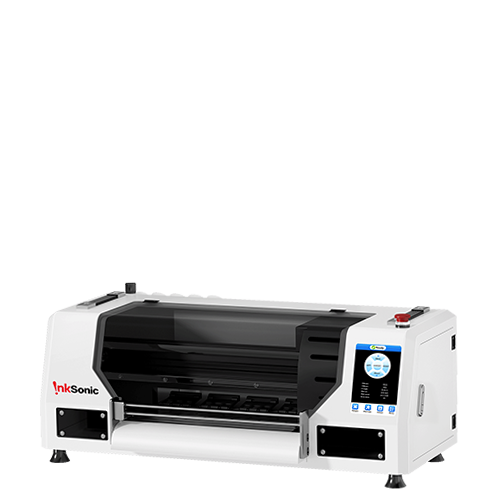
The InkSonic VF13 is an example of this smaller-format UV DTF workflow. Its A3 / 11.8-inch system combines printing and lamination to produce transfers for acrylic, glass, metal, wood, plastic, and similar hard surfaces. For a sign shop, that makes it better suited to plaques, branded pieces, smaller graphics, and customized objects than full-sheet board production. It is not a substitute for a UV flatbed used for large coroplast sheets or 4×8 rigid signage.
Wide-Format Printers for Banners and Vinyl Signs
Wide-format roll printers are designed for flexible media such as banners, adhesive vinyl, wall graphics, window graphics, and vehicle wraps. Instead of placing a rigid board on a flatbed, the printer feeds roll media continuously through the machine, making it better suited to long graphics and repeat production on flexible materials.
Eco-Solvent, Latex, or Resin?
Eco-solvent is widely used for outdoor signs, decals, wraps, and general vinyl graphics. Latex and resin printers can cover many of the same applications, including banners, retail graphics, wall coverings, window graphics, and adhesive media.
The better choice depends less on the category name and more on the media and workflow you use. Compare compatible materials, drying or curing behavior, outdoor durability, finishing time, and whether the printer fits the applications you produce most often.
For banners and wraps, print width is another major factor. Many commercial shops use 54- to 64-inch machines because these widths cover common banner, vinyl, and wrap jobs without requiring ordinary graphics to be split into multiple panels. Smaller machines can still work well for decals or narrower graphics, but frequent large-format work adds more tiling, alignment, and handling.
When comparing wide-format printers, focus on:
Printable width: Can it handle your common banner and wrap sizes without excessive paneling?
Media compatibility: Does it support the vinyl, banner material, wall media, or specialty films you use?
Production speed: How quickly can finished prints move through normal shop volume?
Outdoor durability: Will the ink and media combination hold up for the intended use?
Finishing requirements: Does the print need drying, lamination, contour cutting, hemming, mounting, or other work before delivery?
These downstream steps matter because printer speed is only one part of production. A fast machine will not necessarily produce finished signs faster if lamination, cutting, hemming, or mounting becomes the bottleneck.
Print-and-Cut Machines for Decals and Stickers
If stickers, labels, window decals, vehicle lettering, or other shaped vinyl graphics are regular products, contour cutting needs to be part of the equipment decision from the start. Full-color decals require both printing and cutting, so the usual setup is either an integrated print-and-cut machine or a printer paired with a separate vinyl cutter.
Integrated Print-and-Cut vs. Separate Printer and Cutter
An integrated print-and-cut machine keeps both steps in one device. It saves floor space, reduces job handoffs, and is often easier to manage in a smaller shop.
A separate cutter takes more space and requires an additional alignment step, but it can cut one job while the printer starts another. That parallel workflow becomes more useful as order volume grows.
Choose based on how you work:
Integrated print-and-cut: better for smaller shops, limited floor space, and simpler production flow.
Separate printer and cutter: better when multiple jobs overlap and printing and cutting need to run at the same time.
A vinyl cutter by itself is different. It can cut colored vinyl for simple lettering, logos, numbers, and layered designs, but it cannot produce full-color printed graphics. Full-color stickers, decals, and printed vinyl graphics still need a printer before contour cutting.
How to Choose the Right Sign Printer for Your Business
A good sign printer should match the work you expect to repeat, not just the widest list of features. Use the questions below to narrow the category first; comparing individual sign making printer models is much easier once the workflow is clear.
1. What Do You Print Most Often?
If rigid boards make up most of your orders, start with a UV flatbed. If banners and adhesive vinyl dominate, a roll printer is the more natural fit. Shops focused on stickers and shaped graphics need print-and-cut capability, while businesses producing transferable hard-surface graphics have a clearer use case for UV DTF.
The occasional odd job should not drive the purchase. A shop producing coroplast panels and safety signs every week has a different equipment mix from one that mainly sells wraps, decals, banners, and other flexible graphics.
2. Do You Need Direct-to-Board Printing?
Choose a flatbed when you want the board itself to come off the printer with the image already on it. For repeated rigid-panel work, removing the vinyl-mounting step can shorten production and reduce the amount of manual application involved.
If you already have an established roll workflow, direct-to-board printing may be less important. You can print adhesive vinyl, laminate it, and apply it to the board using equipment that is already part of the shop. The trade-off is straightforward: lower equipment duplication, but more finishing labor on each board.
3. Do You Need Contour Cutting?
Contour cutting is essential for stickers, decals, lettering, shaped labels, and many vehicle graphics. You can handle it with one print-and-cut machine or with a printer and separate cutter; the better setup depends mainly on how much space you have and whether you want printing and cutting to run at the same time.
For rectangular banners and directly printed rigid boards, cutting is less likely to determine the printer choice. Print width, bed size, trimming, routing, and other finishing equipment usually have a larger effect on the workflow.
4. What Size Products Do You Make?
Choose the machine around the largest product you expect to make regularly. Buying for a rare oversized order can leave you paying for print area, floor space, and handling capacity that sits unused most of the year.
Typical Output |
Size Direction |
Small acrylic signs / hard-surface customization |
Desktop / small-format |
Small decals / vinyl graphics |
24–30" class |
Banners / wraps / commercial vinyl graphics |
54–64" roll printer |
Full-sheet rigid signs |
4×8 flatbed |
A desktop system is suitable for small graphics, but tiling larger jobs adds setup and alignment work. A 24- to 30-inch machine covers many small decals and vinyl graphics, while 54- to 64-inch roll printers are more typical for commercial banners and wraps. Full-sheet rigid signage may call for a 4×8 flatbed.
Occasional oversize jobs can often be outsourced. That may cost less than moving to a much larger machine once you include the extra floor space and handling it requires.
5. What Is Your Actual Production Mix?
A full-service sign shop often ends up using more than one printing technology. One machine may handle banners and decals, another may print rigid boards, and UV DTF may cover smaller applied graphics or customized hard-surface pieces.
Before buying, look at the jobs you already outsource, the materials you use most, and the sizes customers actually order. Those patterns show where new equipment could save the most time or outside-production cost. The goal is to solve a recurring production need, not collect the longest spec sheet.
What Else Do You Need to Start Printing Signs?
Printing is only one part of producing a finished sign. A UV flatbed workflow may also require RIP software, substrate storage and handling, cutting or routing equipment, and suitable workspace or ventilation where required.
Roll production often adds RIP software, a laminator, a vinyl cutter or plotter, application tools, and trimming equipment. That is why the listed price of a printer for printing signs rarely represents the full startup cost; the finishing setup can be just as important to what you are actually able to sell.
You may not need a printer immediately. A basic sign-making workflow can start with design software, colored vinyl, a cutter, and application tools. Owning a dedicated machine becomes more important when customers begin asking for full-color graphics, larger media, or direct board work on a regular basis.
FAQs About Printers for Signs
Can a UV Printer Print Signs?
Yes. A UV flatbed can print directly on suitable rigid materials such as acrylic, coroplast, PVC, wood, foam board, and metal. White ink is useful for clear or dark substrates because it can sit beneath the color layer. Flatbeds are not automatically the best choice for banners, wraps, or other flexible roll media.
Can a Regular Printer Print Signs?
For small paper signs, proofs, or temporary indoor pieces, a regular desktop printer can be enough. Commercial sign work usually calls for larger media handling, more durable ink and media, or equipment designed for rigid boards or wide-format rolls.
Do You Need a Printer and Cutter to Make Signs?
Only when the product requires both steps. Full-color shaped stickers, decals, lettering, and similar graphics need printing plus cutting, while directly printed rigid boards may only need trimming or routing. A print and cut printer combines printing and cutting in one system; separate equipment gives you more flexibility as production volume grows.
What Size Printer Do You Need for Signs?
Match the printer to the size you produce most often: desktop or small-format for smaller hard-surface graphics, 24–30 inches for many decals and vinyl jobs, 54–64 inches for many banners and wraps, and a 4×8 flatbed for full-sheet rigid signs.
How Much Does a Commercial Sign Printer Cost?
Commercial pricing spans a wide range. As of September 2026, current examples run from about $7,500 for a 24-inch eco-solvent print-and-cut machine to roughly $12,000–$14,000 for 54-inch professional print-and-cut systems. A 2×3-foot UV flatbed can be around $25,000, while some 4×8 models are near $65,000. Small UV DTF equipment sits in a different category; the InkSonic VF13 is currently $4,799. Budget for the whole setup—including RIP software, cutters, laminators, finishing tools, ink, media, and workspace—not just the printer.


