




If you're choosing a printer for yard signs, start with the production workflow. A UV flatbed printer can print directly on corrugated plastic and Coroplast, while a wide format printer typically prints graphics onto adhesive vinyl that is then applied to the board. For shaped logos, lettering, or decals, a print-and-cut printer adds contour cutting to the process.
For most yard sign printing, the main choice is direct UV printing or a vinyl-based workflow. A UV DTF printer can handle smaller hard-surface graphics, but it is not the practical choice for full-size 18 × 24 yard signs. There is no single best printer for yard signs for every business, the right yard sign printer depends on the materials, sizes, and order volume you produce most often.
What Type of Printer Is Used for Yard Signs?
A yard sign printer should match the production path, not just the sign itself. A shop that prints hundreds of rigid panels has different needs from one that makes occasional custom yard signs alongside banners, decals, and vehicle graphics. The table below shows the main options.
Printer Type |
Typical Yard Sign Workflow |
Best Fit |
UV flatbed printer |
Print directly on the rigid board |
Coroplast, PVC, acrylic, and other rigid substrates |
Wide format printer |
Print vinyl, then apply it to the board |
Shops already producing banners, decals, and vinyl graphics |
Print-and-cut printer |
Print and contour-cut the graphic |
Logos, lettering, decals, and shaped graphics |
UV DTF printer |
Print a transfer, then apply it to a hard surface |
Smaller customized hard-surface graphics |
UV Flatbed Printers for Direct Printing on Corrugated Plastic
A UV flatbed printer is the most direct option for Coroplast yard signs because it prints the graphic straight onto the board and cures the ink during the same process. This removes the separate vinyl printing and mounting steps, making it especially useful when rigid signs are a regular part of production. The same printer may also handle PVC, acrylic, foam board, and other compatible rigid materials.
When choosing one for yard signs, focus on three things:
Bed size: Make sure the usable print area can fit the 18 × 24-inch or larger boards you plan to produce.
Board handling: Check that the printer can hold lightweight corrugated plastic flat and consistently during printing.
White ink: Usually unnecessary for standard white Coroplast, but useful if you also print colored, dark, or clear rigid materials.
Wide-Format Printers for Vinyl Yard Signs
A wide-format printer makes yard signs indirectly: it prints the design onto adhesive vinyl, which is then cut and applied to Coroplast or another rigid blank. A common workflow is print → laminate if needed → cut → apply. This setup is especially practical for shops that already produce banners, decals, vehicle graphics, or window graphics because the same roll printer can serve many products.
When deciding whether this workflow fits your business, focus on three things:
Printer type: Eco-solvent and latex printers are common options for printable adhesive media and outdoor graphics.
Existing equipment: A laminator and cutter make this workflow much easier to integrate if you already run roll media.
Labor: Vinyl adds cutting, alignment, and application steps, so it stays flexible at lower or mixed volume but can become labor-heavy for large runs of identical yard signs.
Print-and-Cut Systems for Custom Yard Sign Graphics
A print-and-cut system is useful when yard sign graphics need contour-cut shapes, lettering, logos, or decals rather than a simple rectangular print. An integrated printer/cutter handles both steps in one machine, while a separate roll printer and vinyl cutter split the work between two devices. The integrated setup saves space and keeps printing and cutting in one workflow; a separate cutter adds another step but can continue cutting while the printer moves on to the next job. A vinyl cutter by itself only works for cut vinyl or simple lettering, so full-color graphics still require a printer somewhere in the workflow.
UV DTF Printers for Small Custom Graphics on Hard Surfaces
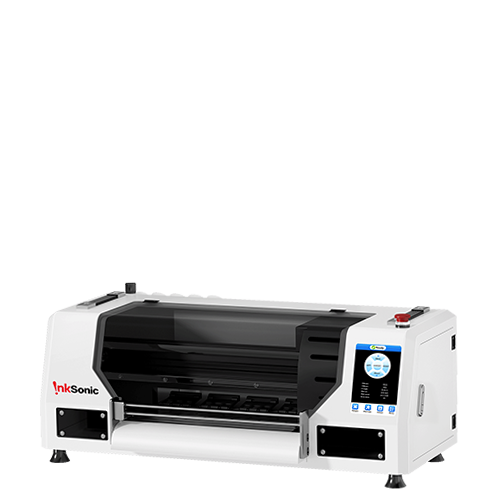
UV DTF is better suited to small transferred graphics than full-size yard sign production. It prints the design onto transfer film and applies the finished graphic to the hard surface, so the sign itself never goes through the printer. For smaller logos, plaques, labels, or customized details, an A3 system such as the InkSonic VF13 can fit this workflow well. For a standard 18 × 24 Coroplast sign, however, applying transfers by hand usually adds more work than direct UV printing or a vinyl-based workflow.
How to Choose a Printer for Yard Signs
A printer for making yard signs should be sized around the work you expect to repeat, not the largest job you can imagine. Four factors usually narrow the choice quickly: material compatibility, print size, outdoor durability, and production volume.
Material Compatibility
Coroplast is one of the most common yard sign materials because it is lightweight, inexpensive, and easy to handle. If you want the printer to print directly on the board itself, the printer must accept that rigid material and its thickness.
A flatbed also gives you room to expand into PVC, acrylic, foam board, and other rigid materials. A roll-based yard sign printing machine has a different requirement: it only needs to handle the printable vinyl, because the finished graphic is applied later. Material compatibility is therefore really a workflow question - do you want to print the board or the graphic that goes onto it?
Print Size
Standard 18 × 24 yard signs are a useful benchmark. For direct printing, the usable flatbed area must accommodate the full board with enough clearance to load it safely. Do not assume a machine can handle a sign just because its advertised dimensions look close; check the actual printable area.
For vinyl production, print width matters instead. A 24-inch-class machine can handle many 18 × 24 or 24 × 18 yard signs, while wider equipment makes it easier to gang multiple graphics together and move into larger signage. Choose the print size around the largest product you expect to produce regularly.
Outdoor Durability
Yard signs live outside, so outdoor durability depends on the full ink-and-media system rather than the printer alone. The substrate, ink, laminate, surface preparation, and exposure conditions all affect how long the finished sign holds up.
Terms such as weather resistant and UV resistant are useful only when they describe the actual combination you plan to sell. With direct UV printing, check adhesion and durability on the intended board. With printed vinyl, match the vinyl and laminate to the expected outdoor use. The goal is not just a durable ink; it is a durable finished sign.
Production Volume
A small business making a few custom orders each week can justify a very different setup from a sign shop running Coroplast every day. Low or mixed volume often favors a roll printer because the same machine can stay busy on decals, banners, window graphics, and other products when yard sign orders are quiet.
Higher-volume rigid production favors fewer handling steps. If operators are mounting vinyl onto board after board, a UV flatbed may remove enough labor to change the economics of the job. That is why the right sign printer for yard signs depends on the actual production mix, not only the price of the printer.
UV Printing vs Vinyl Printing for Yard Signs
UV printing and vinyl application can both produce professional yard signs, but the production experience is different. Direct UV printing keeps the graphic on the board from the start. Vinyl separates printing from application, which adds labor but lets one roll printer serve a much broader product range.
|
UV Printing |
Vinyl |
Workflow |
Direct print |
Print, finish, and apply |
Material |
Rigid substrate |
Adhesive vinyl + board |
Setup |
Fewer production steps |
More handling steps |
Cutting |
Usually trimming or routing |
May include contour cutting |
Best use |
Repeated rigid sign production |
Multi-purpose sign production |
For repeated rigid-board orders, direct UV printing can reduce application labor. For a shop that also sells banners, wraps, decals, and other flexible graphics, a vinyl workflow can make better use of one machine. Neither process is automatically better; the better fit is the one that matches the work moving through the shop most often.
FAQ
What kind of printer do I need to print yard signs?
For direct printing on Coroplast or another rigid board, a UV flatbed is one of the most practical options. If you already work with printable vinyl, a wide-format eco-solvent or latex setup can also produce yard signs by printing the graphic and applying it to the board. The right yard sign printer depends on whether you want direct-to-board production or a vinyl-based workflow.
Can you print directly on corrugated plastic?
Yes. A compatible UV flatbed can print directly on corrugated plastic and other rigid sign materials. Check the printer's supported media thickness, bed size, ink adhesion, and any recommended surface preparation before production.
Can a regular printer print yard signs?
A normal desktop printer is usually too small for commercial yard signs and is not designed to feed rigid Coroplast. You could print small paper or vinyl sections and mount them, but the seams and extra labor make that impractical for routine production. A dedicated yard sign printing workflow is a better fit once the product becomes regular work.
What size printer do I need for 18 × 24 yard signs?
For direct printing, the flatbed must have a usable area large enough for an 18 × 24-inch board. For a vinyl workflow, a printer that accepts roughly 24-inch-wide media can cover many standard designs. Wider 30-, 54-, or 64-inch machines become useful when you want to gang several graphics together or expand into larger signs and banners.
Is UV printing better than vinyl for yard signs?
UV printing has a shorter production path because the image goes directly onto the board. Vinyl takes more steps, but the same roll printer can also produce decals, banners, wraps, and other flexible graphics. Direct UV often makes more sense for repeated rigid work; vinyl often makes more sense for a broader product mix.
Can you use a DTF printer to make yard signs?
A standard DTF printer is designed for textile-transfer production, not rigid yard sign boards. It prints onto transfer film using DTF ink and adhesive powder before the design is heat-transferred to fabric. That is not the normal process for Coroplast, PVC, or acrylic signs, so a UV flatbed or printed-vinyl workflow is usually more appropriate.
Can UV DTF be used on yard signs?
UV DTF transfers can be applied to many compatible hard surfaces, so they may work for smaller graphics or specialty details on suitable sign materials. They are not the same as direct UV printing. Because the transfer still has to be applied by hand, UV DTF is usually less efficient for full-size Coroplast production than a flatbed or wide-format vinyl workflow.


