


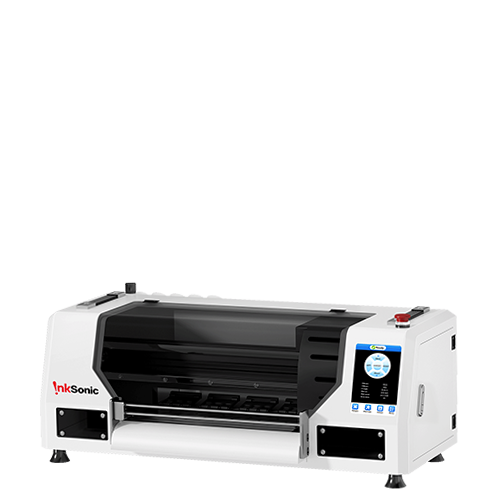


The best entry level DTF printer is not necessarily the cheapest. For a first-time owner, print width, white-ink management, maintenance, RIP software, support, and finishing equipment matter as much as price. An A4 DTF printer or converted Epson DTF printer lowers the barrier to entry, while a purpose-built DTF printer in A3 or 13-inch format usually gives small apparel sellers more usable print area and DTF-specific workflow features.
If you mainly want to experiment with small designs and very low volume, A4 may be enough. If you plan to sell standard shirts, hoodies, totes, or small gang sheets, a purpose-built A3 DTF printer is often the more practical starting point. More automation can reduce manual work but raises cost and space needs, so your first DTF printer should match the products and volume you expect to handle.
What Should You Look for in an Entry-Level DTF Printer?
A starter DTF printer should be manageable for a first-time owner, not simply cheap. Compare models against four questions: what you plan to make, how often you will print, how much maintenance you can handle, and whether the machine leaves enough room to grow.
Factor |
What a Beginner Should Look For |
Print width |
Enough usable area for the products you plan to sell |
White ink system |
White ink circulation, white ink stirring, and filtration where applicable |
Cleaning |
Automatic cleaning that reduces, rather than pretends to eliminate, routine care |
Film handling |
Stable sheet or roll feeding |
RIP software |
Simple layout, white-layer control, nesting, and repeat-job workflow |
Maintenance access |
Parts that are easy to inspect and clean |
Support |
Setup guidance, troubleshooting, warranty, and replacement parts |
Complete workflow |
A clear understanding of curing, pressing, and consumables still required |
Room to grow |
Enough width and capacity that you do not outgrow the machine immediately |
Print width determines what you can produce comfortably. An A4 DTF printer works well for small logos and pocket prints, while an A3 DTF printer gives you more room for standard adult graphics and gang sheets without giving up the compact footprint of a desktop DTF printer. Check the actual usable print width, not just the advertised media size, because margins and feed design can reduce the printable area.
White ink is the next major consideration. DTF ink needs an opaque white layer, so features such as white ink circulation, white ink stirring, and automatic cleaning can reduce settling and manual intervention. They do not eliminate DTF printer maintenance, however; nozzle checks, the capping station, wiper, and ink path still need routine attention.
For a first DTF printer, technical support, training, warranty, and access to replacement parts can matter as much as the hardware. Confirm what setup help is included, whether the RIP license is provided, and how service issues are handled. A converted Epson DTF printer usually lowers the initial cost but requires more owner involvement, while a purpose-built DTF printer typically offers feeding, white-ink management, cleaning, and service access designed around the DTF workflow.
A4 vs A3: Which Size Is Better for Your First DTF Printer?
A4 and A3 machines can both work for beginners, but they solve different problems. The better choice depends on whether you are learning the process or building a product line you expect to sell.
A4 |
A3 / 13-inch |
|
Initial cost |
Usually lower |
Usually higher |
Workspace |
Smaller |
Still desktop-friendly |
Small logos |
Good |
Good |
Adult apparel graphics |
More limited |
More flexible |
Gang-sheet flexibility |
Lower |
Higher |
Risk of outgrowing |
Higher |
Lower for small apparel businesses |
An A4 DTF printer makes sense if you are experimenting, your budget is extremely limited, most of your designs are small, or your production volume is very low. It can be a practical learning platform for home DTF printing when space matters more than throughput.
An A3 DTF printer makes more sense when shirts are the product rather than the experiment. Standard adult graphics, hoodies, tote bags, and small gang sheets are easier to handle when you have more width. A 13 inch DTF printer also gives you more flexibility to group designs, reduce film waste, and take on a wider range of custom jobs.
That does not mean A3 is universally better. A larger machine costs more, uses more space, and may be unnecessary for someone printing occasional logos. The key question is whether the smaller format will still fit the products you expect to sell six months from now.
If you are looking for a DTF printer under $1000, the most important step is to check what that price actually includes. A low purchase price may exclude the curing oven, heat press, RIP software, maintenance supplies, or consumables required to make finished transfers.For a fair budget comparison, total the printer, finishing equipment, first set of consumables, software, cleaning supplies, and any required accessories. That number is closer to the cash needed to start producing than the advertised printer price alone.
How Much Maintenance Should a Beginner Expect?
DTF printing is not maintenance-free. Even a beginner friendly DTF printer needs routine nozzle checks, basic care around the capping station and wiper, waste-ink monitoring, a clean film/feed path, and regular checks of the white-ink system. Printhead cleaning may be needed when a nozzle check shows missing lines, but it should not be the default response to every issue.
Printhead clogging is only one possible cause of poor output; ink delivery, cap-top sealing, wiper condition, contamination, and long idle periods can also affect printing. Maintenance frequency varies by machine and usage, so follow nozzle-check results and the manufacturer’s guidance instead of relying on one fixed schedule or repeated aggressive cleaning cycles.
Manual Maintenance vs Automated Maintenance
Automation can help with white ink movement, scheduled cleaning, ink circulation, and downtime care. Features such as holiday mode are especially useful for side-hustle owners who may not print every day. Automatic cleaning can reduce manual intervention, but it does not eliminate routine inspection and cleaning.
When comparing the best starter DTF printer options, ask whether the maintenance routine is clear, accessible, and realistic for your schedule. A machine with more automation may be easier to live with, but no DTF system is truly hands-off.
Printhead technology also does not determine beginner-friendliness by itself. L1800, XP600, and i1600 are names you may see while comparing machines, but the surrounding ink system, feeding design, cleaning access, software, parts availability, and support can matter just as much as the head platform.
Lower-Volume Manual Workflow
A simple workflow is printer -> DTF powder -> curing oven -> heat press.
This approach keeps equipment cost lower and can work well for a small number of daily orders. The trade-off is more hands-on time for powdering, curing, and handling each transfer.
More Automated Workflow
A more automated setup adds a powder shaker or integrated powder-and-curing system, reducing manual finishing work on longer runs but increasing cost, footprint, and system complexity. A DTF printer bundle can simplify setup if the finishing equipment is compatible, but buyers should still check exactly what is included.
The better upgrade depends on the bottleneck. If printing is limiting output, a shaker will not fix print speed; if powdering and curing are slowing every batch, automation may save more time than a printer upgrade. A lower-priced machine may work for testing, but it does not always represent the lowest total cost once equipment, labor, and maintenance are included. For a growing apparel business, reliability and workflow efficiency often matter more than the lowest purchase price.
Which Type of Entry-Level DTF Printer Is Right for You?
There is no universal best DTF printer for beginners; the right starting direction depends on what you plan to sell, how often you print, and how much manual work you want to handle.
Your Situation |
Better Starting Direction |
You only want to experiment |
A4 or lower-cost setup |
You're starting a shirt side hustle |
Purpose-built A3 |
You're building an Etsy/custom apparel business |
A3 with manageable maintenance |
You print irregularly |
Prioritize downtime maintenance features |
You expect volume to increase |
Prioritize width, feeding, and room to grow |
You want minimal manual powder/curing work |
More automated system |
Demand is completely unproven |
Consider outsourcing transfers first |
If your main goal is learning, a basic setup may be enough. If you are building a small apparel business, a small business DTF printer should give you enough print width, reliable feeding, workable maintenance, and support to produce repeat orders without immediately becoming a bottleneck.
If you are still unsure whether customers will buy, outsourcing transfers can also be a rational first step. It lets you validate demand before committing to equipment, consumables, maintenance, and workspace.
Outsourcing is most useful when orders are sporadic or demand is still uncertain. In-house printing becomes more attractive when faster turnaround, control over reprints, and repeat volume are worth the fixed cost and maintenance responsibility of owning the equipment.
InkSonic Spark F13
The InkSonic Spark F13 fits the purpose-built A3 category for first-time owners moving into small apparel production. Its 13-inch format gives more room for adult shirt graphics, hoodies, totes, and small gang-sheet work, while white-ink circulation, stirring, filtration, Holiday Mode, automated cleaning, roll-film handling, and RIP tools help simplify routine DTF workflow and maintenance.
It is not the cheapest option for experimentation, and routine maintenance, powdering, curing, and heat pressing are still required. The Spark F13 is best viewed as a purpose-built starter system for small apparel production rather than a replacement for a high-volume automated line.

FAQs
Is A3 or A4 better for beginners?
Neither size is automatically the best entry level DTF printer for everyone. A4 is useful when you are experimenting, printing small designs, or trying to keep cost and workspace as low as possible. A3 is usually more flexible for standard adult apparel and gives a growing shop more room before the print width becomes restrictive.
How much should I spend on my first DTF printer?
Start with the complete workflow rather than the printer alone. The right budget has to include consumables, RIP software, curing, a heat press, cleaning supplies, workspace, and the level of support you need. The best entry level DTF printer is the one you can operate and maintain reliably without immediately needing to replace major parts of the setup.
Is a converted Epson a good beginner DTF printer?
It can be. A converted Epson can lower the upfront cost, but it usually places more setup and maintenance responsibility on the owner. If you enjoy troubleshooting and understand the ink system, that trade-off may be acceptable. If you want a more guided first experience, a purpose-built DTF printer may be easier to manage.
Is an L1800 DTF printer good for beginners?
An L1800-based machine can work for beginners, but the platform name alone does not tell you whether it is a good starter DTF printer. White-ink management, film feeding, cleaning access, RIP software, maintenance design, technical support, warranty coverage, and replacement parts all affect the ownership experience.
Do entry-level DTF printers need daily maintenance?
They need routine care, although the exact schedule depends on the machine and how often you print. Automated circulation, scheduled cleaning, and holiday mode can reduce hands-on work, but they do not eliminate nozzle checks, cleaning, or inspection of the ink and maintenance systems.
Do I need a curing oven?
You need a reliable way to cure the adhesive powder before transfer. A curing oven is a common solution for small DTF setups, while more automated systems may combine powder application and curing. The exact equipment depends on your production volume and workflow.
Can I use a DTF printer at home?
Yes, but home DTF printing requires more than finding space for a desktop DTF printer. You also need room for PET film, DTF ink, DTF powder, cleaning supplies, a heat press, curing equipment, and finished transfers. Heat, fumes, powder handling, maintenance access, and appropriate ventilation should all be considered when planning the workspace.


