


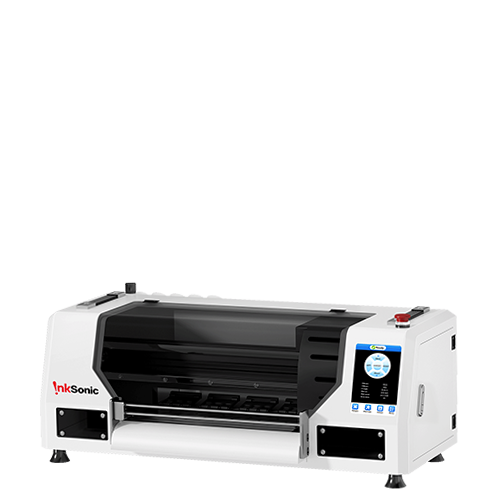


The best UV DTF printer depends on your order volume, product mix, and maintenance needs. Since UV DTF printing uses A and B films to create decals for hard surfaces rather than printing directly on objects, usable print width, film handling, and workflow reliability are key considerations. An A3 (30 cm) all-in-one is a practical choice for small shops, while 40–60 cm models better suit businesses with consistent, high-volume orders.
What Should You Prioritize in a UV DTF Printer?
Before comparing individual models, narrow the decision around four things:
Product fit: Start with the products you actually sell. Tumblers, phone cases, acrylic products, and transfer sheets can require different print widths, detail levels, and workflow priorities.
Usable print width: Choose the smallest width that comfortably handles your regular designs. Extra width only adds value when your order mix can use it.
Workflow stability: Compare white-ink management, film feeding, lamination, maintenance access, parts availability, and technical support—not just printhead count.
Real production capacity: Judge a machine by completed, sellable transfers per shift rather than headline print speed. Loading, lamination, cutting, inspection, and reprints all affect actual output.
Which Type of UV DTF Printer Is Right for You?
UV DTF printers fall into a few practical size and workflow classes. The right one depends on whether you are testing demand, running a steady small-business workload, or producing transfers continuously for other sellers.
Desktop or A3 UV DTF Printers
An A3 UV DTF printer is usually the easiest class to fit into a home studio, small workshop, or existing personalization business. Around 30 cm of print width is enough for most cup wraps, logos, phone-case decals, labels, and small hard-surface graphics, while the machine remains easier to place and power than a production-width system.
For example, InkSonic's VF13 combines an 11.8-inch roll format, dual XP600 printheads, CMYK + white + varnish, and integrated lamination in one compact workflow. That makes it relevant to small shops producing short-run hard-surface transfers, provided the 11.8-inch width fits their regular jobs.

A3+ or Mid-Size All-in-One UV DTF Printers
This category sits between compact 30 cm systems and 40–60 cm production lines; always compare actual printable width rather than relying on labels such as A3+. Mid-size all-in-one machines suit shops that have moved beyond occasional custom work but still want a compact workflow. The value here is less about gaining a few extra centimeters of width and more about stronger roll handling, faster output, better monitoring, and reduced operator intervention.
Before paying more for an A3+ system, compare the real work area, printhead layout, lamination method, and duty cycle. Two printers can both be marketed as A3+ while delivering very different production speeds and maintenance requirements.
40–60 cm Production UV DTF Printers
A 40–60 cm UV DTF printer is a production purchase. The wider roll allows more designs to be nested across the media, which can reduce handling on large batches and make transfer-by-the-foot or wholesale work more practical. These systems are better suited to shops with predictable daily volume than to beginners who are still finding their product mix.
Moving to a wider printer also means more floor space, larger film rolls, higher ink use, tighter tension control, and more expensive downtime. If the business cannot regularly use the extra width, the larger platform may add overhead without improving profit.
What Should You Look for When Buying a UV DTF Printer?
Print Width and Real Production Capacity
Print width determines how efficiently you can nest designs, but it should not be treated as a productivity score by itself. Measure your common artwork first. If most jobs are cup wraps, logos, phone-case decals, or small labels, a 30 cm roll can already use the media efficiently. Wider film becomes more valuable when you routinely build large gang layouts or sell transfer rolls.
Ask for speed at a stated print mode rather than accepting a vague "high-speed" claim. Then account for film loading, lamination, cutting, and quality checks. What matters in practice is how much finished work one operator can produce during a normal shift.
Printhead Configuration and Replacement Cost
Printheads affect speed, ink-channel layout, detail, and long-term service cost. Depending on the configuration, dual-head systems can separate CMYK from white and varnish channels or use the additional head capacity to increase output. More heads also mean more components to align, clean, and eventually replace. A production shop may accept that complexity for higher throughput, while a smaller business may prefer a simpler setup with easier parts access.
Before buying, confirm the exact printhead model, whether it is covered by warranty, what a replacement costs, and whether the supplier stocks dampers, cap tops, wipers, pumps, and cables. A low printer price is less meaningful if one failed part creates weeks of downtime.
White Ink Circulation and Automatic Cleaning
White ink is one of the areas where maintenance design matters most. The pigment can settle when the printer sits, so circulation or stirring helps keep the ink system more stable. Automatic cleaning can also reduce the risk of clogged nozzles after short idle periods.
These features reduce routine work; they do not eliminate it. Operators still need to inspect nozzles, keep the capping station and wiper clean, monitor waste ink, and follow the manufacturer’s idle-time procedure. If the business regularly closes for weekends or holidays, ask exactly what the machine does while unattended.
Built-In Lamination vs Separate Laminator
Integrated lamination is attractive because the transfer moves directly from printing and UV curing into the lamination stage. That saves floor space and reduces opportunities for dust, skew, or operator misalignment. It is often the cleaner choice for a compact shop.
A separate laminator gives you more control over the lamination stage and allows that part of the workflow to be serviced or replaced independently. The trade-off is extra loading, alignment, and floor space. Choose the setup that fits the way you expect to work every day rather than assuming an all-in-one system is automatically better.
Film Feeding, Tension, and Roll Handling
A printer can have excellent image quality and still waste material if the film does not track straight. Look for stable feeding, adjustable tension, secure take-up, and a path that is easy to reload. Wrinkles, lateral drift, or uneven lamination often show up as production problems long before the printhead reaches its theoretical speed limit.
RIP Software and Color Workflow
The RIP should make it straightforward to build color, white, and varnish layers, control ink density, nest jobs, and repeat settings for products you sell every week. Good profiles and a repeatable file setup are more useful than a long list of software effects. Also confirm operating-system compatibility, license terms, and whether support can help with spot layers and color setup.
Parts, Warranty, and Technical Support
Technical support becomes especially important when downtime puts customer orders at risk. Check what the warranty actually covers, whether the printhead is treated differently from other components, where replacement parts ship from, and how support is delivered. Video calls, remote diagnosis, setup guidance, and clear maintenance documentation can be worth more to a small business than a modest difference in purchase price.
How to Choose a UV DTF Printer Based on Your Products
Your product mix should narrow the choice quickly. UV DTF is most useful when you want full-color transfers for hard surfaces without placing the object inside the printer. The table below shows which equipment priorities change with the products you plan to sell.
Product |
What to Prioritize |
Why It Matters |
Tumblers and bottles |
Reliable roll feeding, integrated lamination, enough width for wraps |
Curved products rely on a clean, flexible transfer and consistent adhesive coverage. |
Acrylic products / small acrylic signs |
Fine detail, strong white/varnish control, larger transfer area if needed |
UV DTF can decorate compatible acrylic surfaces without loading the object into the printer, but large full-sheet or direct-to-object sign production may be better suited to a UV flatbed workflow. |
Glass products |
Good film quality, controlled varnish, careful adhesion testing |
Smooth glass can look excellent, but surface preparation and intended washing matter. |
Phone cases |
A3/30 cm width, fine detail, easy short-run changeovers |
Most graphics are small, so precision and repeatability matter more than wide media. |
Packaging and labels |
Roll stability, nesting, fast repeat output |
Many small graphics reward efficient layout and consistent registration. |
Promotional gifts |
Versatile white/varnish layers, compact workflow, broad film compatibility |
Product shapes and order sizes change often, so flexibility is valuable. |
Surface compatibility still needs to be tested. UV DTF can work on many smooth hard surfaces, but a transfer that sticks during application may not hold up in real use. Washing, abrasion, outdoor exposure, flexing, coatings, and low-surface-energy plastics can all affect durability. Test the exact blank before committing to a production run.
How Much Does a UV DTF Printer Cost?
The printer is usually the largest single purchase, but it is not the full startup cost. Compact A3 systems generally cost less than wider production machines, while the final price can vary significantly with printhead configuration, built-in lamination, software, support, and dealer service. Wider 40–60 cm systems usually move into higher commercial price tiers because of their larger roll hardware, higher-capacity components, and production-oriented design.
Instead of comparing machine price alone, build a simple first-year ownership estimate. Include UV ink, white ink, varnish, A/B film, cleaning fluid, waste supplies, RIP software if it is not included, a laminator if the printer does not have one, spare maintenance parts, shipping, electrical setup, ventilation, and a realistic allowance for maintenance.
Consumable waste should be part of the calculation as well. A cheaper machine that needs frequent test prints, head cleaning, film reloading, or re-lamination can cost more per sellable transfer than a more stable printer. For a business, cost per completed order is more useful than the purchase price alone.
Printer Tier |
Indicative Price (USD) |
Example |
Compact A3 / 30 cm |
4,400–7,000 |
InkSonic VF13 — $4,399 |
Mid-size all-in-one / 16–17 in |
9,000–17,000 |
Genesis II 17-inch UV DTF Printer — $8,959.99 |
40–60 cm production |
14,500–22,000 |
Audley 8074-3 60 cm — $22,000 |
Prices checked: October 10, 2026.
What Are the Disadvantages of UV DTF Printing?
UV DTF removes the need to print directly on every object, but it is not maintenance-free. White ink still needs circulation and monitoring, printheads remain wear items, and idle periods can create more work than operators expect. The process also depends heavily on A/B film quality; a poor film pair can create weak adhesion, difficult peeling, bubbles, or inconsistent lamination even when the printer itself is working correctly.
Adhesion varies by surface. Glass, coated metal, acrylic, plastics, painted surfaces, and powder-coated products do not all behave the same, so a transfer that works on one blank should not be assumed to work on another. UV ink and cleaning fluids also require appropriate handling, storage, and ventilation according to the supplier's safety guidance.
The less obvious disadvantage is downtime. A shop that sells transfers daily needs a plan for clogged channels, worn cap tops, damaged film, software issues, and replacement parts. That is why maintenance design and technical support should be treated as production features, not after-sales extras.
Is Buying a UV DTF Printer Worth It?
Buying your own printer makes more sense when recurring orders, faster turnaround, and tighter production control can justify the equipment and maintenance cost. Outsourcing is usually safer while demand is still uncertain or while you are testing new products.
If You Are Testing the Market
If UV DTF is still an experiment, outsourcing first keeps the risk lower. Order transfers for a small set of products, track which designs sell, and see how customers use them. Once repeat orders become predictable, you will have better data for deciding whether an A3 machine can pay for itself.
If You Have Consistent Custom Orders
In-house production becomes more attractive when outsourced transfers are slowing fulfillment or when personalization requires frequent small runs. An integrated A3 system often fits this stage well because it gives the shop control over one-off names, logo variations, and short batches without committing to a production-width line.
If You Run Higher-Volume Production
A wider roll-to-roll system can make sense once the business has enough volume to use it consistently. The reason to upgrade is not that a 60 cm printer looks more professional; it should reduce labor per order, fit more designs across the roll, and increase output enough to justify the higher equipment, consumable, and downtime costs.
Compare buying and outsourcing with actual order numbers: transfer cost, shipping time, average weekly square footage, labor, expected waste, and the payback period for the printer. If the machine would sit idle most of the week, outsourcing may still be the better business decision.
UV DTF Printer FAQs
What Is the Best UV DTF Printer for Home Use?
A compact A3 all-in-one usually balances print capacity with limited workspace. Look for integrated lamination, white ink circulation, easy cleaning, and reliable remote support. Allow space for film handling and proper ventilation.
What Is a Good UV DTF Printer for Beginners?
Beginners benefit more from a reliable workflow than maximum speed. Prioritize clear setup instructions, accessible maintenance parts, and built-in lamination. The InkSonic VF13 is one option if its 11.8-inch working width meets your needs.
Is UV DTF Better Than Regular DTF?
They serve different purposes. UV DTF creates transfers for compatible hard surfaces, while regular DTF uses adhesive powder and heat pressing to decorate fabrics. Choose based on the products you sell.
Do You Need a Laminator for UV DTF Printing?
Lamination is required, but a separate machine may not be. Many all-in-one printers combine A-film printing and B-film lamination, while other systems need standalone equipment.
What Materials Can UV DTF Transfers Be Used On?
Common surfaces include glass, metal, acrylic, ceramic, coated wood, and certain plastics. Adhesion depends on surface finish, cleanliness, and intended use. Always test the actual product before selling.
How Often Does a UV DTF Printer Need Maintenance?
Regularly check nozzles, ink levels, the capping station, wiper, and film path. Maintenance frequency depends on usage and printer design. Follow the manufacturer's instructions, especially before extended idle periods.


