


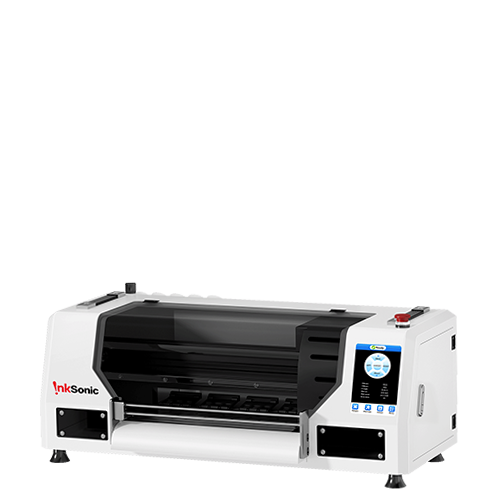


If you're familiar with the InkSonic C13, the Spark F13 will feel familiar in the ways that matter: it stays in the same entry-level A3 DTF printer class, uses the same 13-inch platform, and targets home studios and small custom apparel businesses. The difference is where we chose to improve the ownership experience.
With InkSonic Spark F13, the focus shifts toward white ink management, idle-time maintenance, PET film handling, RIP software workflow, and easier day-to-day access. In this F13 vs C13 comparison, C13 serves as the earlier-model reference, while F13 is the model we recommend new buyers look at first. The biggest changes are not about claiming a completely different level of print quality or production speed. They are about making an A3 DTF printer easier to live with, especially when orders are irregular, space is limited, or repeat jobs are part of a small-batch DTF printing workflow.
Spark F13 vs C13 at a Glance
F13 and C13 are close in core production. Both use a 13-inch platform, are listed at 5-8 minutes per A3 print, and both support roll film and sheet film and use air suction to support PET film feeding. So the comparison is less about raw speed or DTF printer price and more about the workflow around printing.
Area |
Spark F13 |
C13 |
Positioning |
Newer budget-focused A3 model |
Earlier entry-level A3 model |
Printhead |
L1800 |
L1800 |
A3 Print Speed |
5-8 min |
5-8 min |
Occupies |
29.5 × 13.0 in |
28.75 × 11.2 in |
Weight |
42.7 lbs / 19.4 kg |
84 lbs / 38 kg |
White Ink Management |
Stirring + filtering + circulation |
Stirring + filtering + circulation |
Idle Maintenance |
Holiday Mode: auto clean every 12 hours |
Manual cleaning |
Ink Delivery |
Pulse Flow diaphragm pump + upgraded ink damper |
Standard ink-delivery system |
Film Handling |
Air suction |
Air suction |
Roll / Sheet Film |
Supported |
Supported |
Film Cutter |
Platform-mounted sliding film cutter |
No film cutter |
RIP |
InkSonic RIP with advanced workflow tools |
InkSonic RIP |
Maintenance Access |
Quick-access magnetic side doors |
Narrow and cramped maintenance hole |
Initial Ink Priming |
Manual |
Manual |
In an InkSonic DTF printer comparison, F13 keeps that familiar A3 foundation, then adds more support for white ink management, idle maintenance, film feed stability, job setup, cutting, and service access.
What Does Spark F13 Improve Over C13?
Better White Ink and Idle-Time Management
C13 already includes white ink circulation, mixing, and filtration, but periods of inactivity still require attention because white pigment can settle when the printer sits unused.
Spark F13 adds Holiday Mode, which runs a cleaning cycle every 12 hours while the printer is in holiday mode. Its upgraded white ink system also combines stirring, filtration, circulation, and diaphragm-pump ink delivery to keep white ink moving more consistently between print sessions.
This matters especially for users who print heavily on weekends or leave the printer idle for several days. White ink buildup can increase printhead maintenance risk, and that risk has a real cost: InkSonic currently lists an original L1800 replacement printhead at $289.
Both C13 and F13 include six-month printhead coverage with a one-time free replacement, but preventing avoidable buildup is still preferable to relying on replacement coverage. F13 does not eliminate clogging risk; its advantage is that more of the idle-time maintenance process is built into the printer itself.
Easier Film Feeding and Cutting
Film handling gets annoying fast when a shop is bouncing between single-sheet transfers, short custom runs, and roll jobs. The C13 handles both sheet and roll PET film with air suction to help keep the media flat, but Spark F13 adds a cutter to make the process more convenient from start to finish.
Air suction helps guide PET film through the printer more consistently, reducing the chance of lifting, shifting, or buckling during feeding. Once the job is finished, the cutter lets the operator trim the printed section right at the machine instead of stopping to cut every short run by hand. That matters more in a small apparel shop than it may sound. When orders change throughout the day, fewer loading and finishing steps can make the workflow feel less fragmented.
Print speed itself is not the upgrade here. Both models are listed at about 5–8 minutes for an A3 print. F13’s advantage is smoother media handling and fewer manual steps around each job.
Faster Job Setup for Small-Batch Orders
For a small DTF shop, the printer is not always the bottleneck. A lot of time disappears into arranging customer artwork, trimming files, and setting up repeat jobs before printing even starts.
Spark F13’s newer RIP workflow is built around those repetitive tasks. Auto layout and nesting help fit multiple graphics onto the same section of PET film, while cropping removes unused space. Task history also makes repeat orders easier by letting operators pull up earlier jobs instead of rebuilding the setup from scratch. That becomes especially useful for Etsy sellers, local apparel shops, and home businesses handling several small orders in a day rather than one long production run.
Compared with the C13 workflow, F13 puts more emphasis on job organization and repeat-order handling. The value is not one flashy RIP feature; it is cutting down the small setup steps that add up across a busy day.
Easier Monitoring and Maintenance Access
When one person is responsible for printing, maintenance, and order fulfillment, routine checks need to be quick and easy. The Spark F13 is designed to improve visibility and access during daily operation, so operators can monitor key areas without constantly stopping the workflow.
A transparent top cover and internal lighting make it easier to see the print area and PET film path while the printer is running. Visible ink tanks allow ink levels to be checked at a glance, while magnetic side panels provide quicker access to internal components when inspection or maintenance is needed.
These changes are focused on usability rather than reducing machine size. The F13 has a listed footprint of 29.5 × 13.0 inches, compared with 28.75 × 11.2 inches for the C13, and weighs 42.7 lb. It remains a desktop-format printer, but the redesigned enclosure uses that space to improve monitoring, maintenance access, and day-to-day serviceability.
For a home studio or small shop, this means media checks, ink monitoring, and basic maintenance can be handled more easily without disrupting the rest of the production workflow.
Do These Spark F13 Upgrades Actually Matter?
Your Situation |
F13 Feature That Matters |
Practical Impact |
You do not print every day |
Holiday Mode + white ink management |
12-hour idle cleaning and a more structured white-ink routine |
You run small custom orders |
Custom RIP + air suction + cutter |
Faster job setup, repeat-order retrieval, and less manual film handling |
You work from a home studio |
Lighting + transparent cover + magnetic doors |
Easier monitoring and maintenance access |
You are a budget-conscious beginner |
Super low price + newer workflow tools |
More workflow support at the same current printer-only price as C13 |
You need more production capacity |
No major speed-class change |
Both remain about 5-8 min/A3 |
If You Don't Print Every Day
Holiday Mode and the 12-hour maintenance cycle are most useful when the printer regularly sits between jobs.
If You Run Small-Batch or Custom Orders
Task history, auto layout, flexible film handling, and the cutter make short runs and repeat orders easier to organize.
If You Work From a Home Studio or Small Workspace
Internal lighting, a visible print area, and magnetic service doors make daily checks and routine maintenance easier in a home studio.
If You Are a Budget-Conscious Beginner
At the same price, F13 gives beginners the newer maintenance and RIP workflow package.
If Your Priority Is Higher Production Capacity
Both models remain in the same 5-8 min/A3, so higher-volume growth may require a faster platform.
F13 adds the most value when maintenance, PET film handling, access, and repeat-order setup are the real bottlenecks.
Should C13 Owners Upgrade to Spark F13?
For an existing InkSonic C13 owner, F13 makes the most sense when the newer workflow solves a problem you deal with repeatedly. The decision is easier when you compare those pain points directly.
Consider Moving to F13 If... |
Staying With C13 Still Makes Sense If... |
Idle-time maintenance takes too much attention |
Your current maintenance routine is already manageable |
Film feeding or manual cutting slows short-run work |
Your media workflow is stable and efficient |
You want newer RIP tools for repeat orders |
Your current job setup already works well |
Easier service access and monitoring matter |
Current access and monitoring are not pain points |
Your C13 is nearing major service or replacement |
Your C13 is reliable and still has useful service life |
Timing matters too. Holiday Mode, platform-integrated cutter, and magnetic side doors have more value when maintenance or manual handling is already slowing production. If an older C13 is approaching major service, cost becomes part of the decision: InkSonic currently lists an original L1800 replacement printhead at $289.
A reliable C13 does not become obsolete just because F13 is newer. C13 still offers the same 13-inch format, 5-8 minute A3 print speed, roll-and-sheet support, air suction, and white ink circulation, mixing, and filtration.
If that A3 DTF printing setup already matches your order volume and the workflow is efficient, the convenience gains may not justify replacing a working printer yet.
For new buyers, the choice is simpler. F13 gives you the newer maintenance, media-handling, and RIP software workflow at the same entry price. Existing C13 owners should upgrade when those changes solve real production friction, not simply because a newer model exists.
FAQ
What is the biggest difference between Spark F13 and C13?
The biggest difference is workflow. Both use a 13-inch platform and share the same listed print speed, while F13 adds Holiday Mode, a platform-integrated cutter, newer RIP tools, and easier maintenance access.
Is Spark F13 easier to maintain than C13?
Yes, especially around idle periods. F13 adds 12-hour Holiday Mode, updated white ink management, an upgraded ink-delivery system, and easier access for routine DTF maintenance.
Should I upgrade from C13 to Spark F13?
Upgrade if idle maintenance, PET film handling, cutting, or repeat-order setup are recurring pain points. If C13 already meets your needs, F13 is an optional DTF printer upgrade rather than a required replacement.
Is Spark F13 good for beginners?
Yes. F13 keeps the entry-level A3 format while adding more support around white ink management, film handling, RIP software, and job setup. Normal DTF printing still requires basic operator learning.
Does Spark F13 automatically fill ink?
No. F13 includes white ink stirring, filtration, circulation, and Holiday Mode cleaning, but white ink circulation is not automatic ink filling. Initial priming remains part of setup.


