


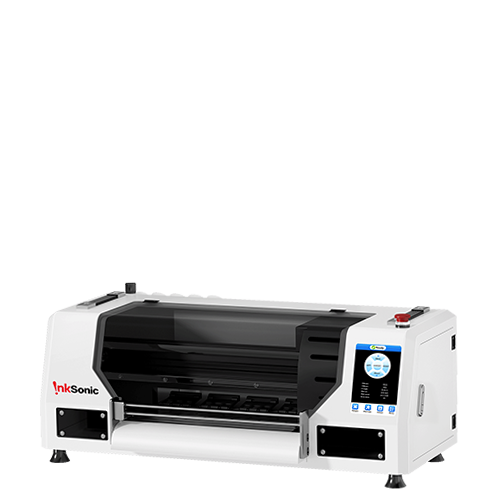


For home-based sellers and growing custom apparel shops, choosing an A3 DTF printer is usually about finding the right balance between cost, maintenance, and daily production needs. That is where InkSonic Spark F13 fits in. Designed for small business users who want more support than a basic entry-level machine, it brings together easier white ink management, more stable film handling, and practical workflow tools in a compact 13-inch platform.
The F13 prints an A3 design in about 5–8 minutes, with an estimated output of around eight T-shirts per hour. Its Holiday Mode runs an automatic cleaning cycle every 12 hours , while the 3-in-1 white ink system combines stirring, filtration, and white ink circulation to help reduce pigment settling during idle periods. Air suction, roll-and-sheet film support, Custom RIP software, and a front-mounted sliding cutter further streamline everyday production.
Spark F13 at a Glance
The Spark F13 DTF printer is best understood as a small-business A3 printer with practical maintenance and media-handling upgrades rather than a fully automated DTF line. Its specification sheet lists a 13-inch print width, 1440 × 1440 dpi resolution, CMYK + WW ink, and a 5–8 minute A3 print time. The printer supports roll-fed and sheet-fed PET film, includes air suction and a film cutter, and runs on Windows 10 or later with InkSonic RIP.
The table below summarizes the main feature.
|
Feature |
Spark F13 |
|
Printer Type |
13-inch A3 DTF printer |
|
Printhead |
L1800 |
|
Print Speed |
5–8 min per A3 print |
|
Estimated Output |
About 8 T-shirts/hour |
|
Holiday Mode |
Automatic cleaning every 12 hours when in Holiday Mode |
|
White Ink System |
Stirring + filtration + circulation |
|
Film Handling |
Air suction + fixed film path |
|
Media |
Roll + sheet film |
|
RIP |
InkSonic RIP |
|
Cutter |
Yes |
|
Main Trade-Off |
Initial ink priming is manual |
The F13 focuses on keeping everyday operation manageable while holding the entry price below more automated InkSonic models. That makes it especially relevant to buyers looking for a DTF printer for small business use without paying for a higher-throughput production system.
What Makes the Spark F13 Worth Considering?
The F13 becomes easier to judge when each feature is tied to a real ownership problem: white ink settling, film movement, inconsistent ink delivery, or repeated setup work. Those are the areas where the machine adds the most practical value.
Holiday Mode and White Ink Management
White ink is the maintenance point that deserves the most attention on any DTF printer. The pigment is heavier than the carrier fluid, so long idle periods can allow it to settle. That can contribute to inconsistent flow, nozzle loss, and clogging if the ink system is not maintained. The cost of ignoring that risk is not trivial: an original L1800 replacement printhead is $289, while the F13 itself includes a six-month printhead warranty with one one-time free replacement.
The F13 is designed to help minimize that risk through Holiday Mode and a 3-in-1 white ink system. Holiday Mode runs an automatic cleaning cycle every 12 hours while the printer is in this mode, helping keep the ink path active during downtime. The system also combines white ink stirring, filtration, and white ink circulation. Stirring helps keep pigment mixed, filtration helps capture particles, and circulation keeps white ink moving instead of sitting completely static. One-button circulation also lets users start the process directly from the printer.
These features cannot completely prevent clogging, but they are designed to reduce pigment settling and buildup, helping lower the chance of white-ink-related nozzle problems and the potential cost of printhead replacement.
More Stable Film Handling
PET film has to stay flat and track consistently under the printhead. If it lifts, shifts, or buckles, the print surface can move away from the intended path and create registration or contact problems. The F13 combines a fixed film path with an air-suction platform to keep the media more controlled as it passes through the printer.
Air suction is there to hold film flatter during printing, while the fixed path reduces unnecessary movement in the feeding route. The machine also accepts both roll film and individual sheets. Sheets are convenient for samples, one-off orders, or short tests; roll film is better suited to repeat designs and small batches.
The important point is stability, not a promise that film problems disappear. Loading technique, film quality, room conditions, and tension can still affect feeding. InkSonic recommends an operating humidity of 40%–60% RH, a useful reference for home studios where seasonal humidity can change quickly.
Ink Delivery and Pump System
The F13 uses InkSonic's upgraded Pulse Flow diaphragm pump to support a more stable ink-delivery system during daily printing. Compared with the squeezing action of a peristaltic design, the diaphragm pump moves ink through controlled pressure changes, helping maintain a steadier flow through the ink path. An upgraded damper works with the pump to regulate pressure before the ink reaches the printhead.
This is especially important for the white ink circulation system. Because white pigment is heavier and more prone to settling than CMYK ink, keeping the ink moving consistently helps support a more stable supply during printing. Together, the pump, damper, and circulation system give the F13 a more structured approach to ink delivery, with the goal of keeping white ink flowing more consistently through the system.
Custom RIP and Easy-Access Film Cutter
The Custom RIP is especially useful for repeat and small-batch orders. Its current toolset includes material-saving auto layout, quick crop, feathering, auto-print after RIP, task traceback, breathable mode, and smart multi-task printing. For an Etsy seller or local apparel shop, task history makes repeat jobs easier to retrieve, so a reorder can move back into production without rebuilding the file setup from scratch.
Auto layout and nesting also help organize multiple graphics on the same film, making mixed small orders easier to prepare in one print run. The focus is simple: reduce repetitive setup around file preparation, reprints, and layout.
For film handling, the F13 uses an easy-access sliding cutter mounted on the output platform. Once printing is finished, the operator can trim the film directly at the front of the machine without using a separate handheld cutter. Together, the RIP tools and front-mounted cutter help streamline short-run production and repeat-order workflows.
What Is the Spark F13 Like to Set Up, Use, and Maintain?
Setup
The F13 arrives with the core hardware assembled, but initial startup still includes ink installation, manual syringe priming, film loading, and RIP setup. The key distinction is ink filling: the current comparison spec does not list first automatic ink filling for the F13. Initial priming therefore requires the operator to draw ink manually with the supplied syringe.
That step is mainly part of startup and service work; it is not something you repeat before every print. Once the ink path is primed and the printer is configured, normal use shifts to file preparation, film loading, nozzle checks, and printing.
Daily Use
The F13 is built around short, repeatable actions. Mechanical controls handle power, feed, reverse, Holiday Mode, and one-click white ink circulation without forcing the operator into software for every task. The transparent cover and internal lighting make it easier to watch the print area, while the air-suction system helps keep PET film flat.
Roll and sheet support also changes how the printer feels in daily use. A single transfer or test can go on a sheet; repeated designs can stay on a roll. With a listed 5–8 minute A3 print time, the F13 is better matched to small-batch jobs than to high-throughput production.
Maintenance
Holiday Mode can run an automatic cleaning cycle every 12 hours while the printer remains powered on. White ink stirring, filtration, and circulation handle another part of the idle-time routine. Quick-access magnetic side doors make the ink and maintenance areas easier to reach, and the package includes 250 ml of nozzle cleaning liquid, 250 ml of nozzle protection liquid, and a printhead moisturizing device.
Routine care still includes nozzle checks, cleaning the capping and wiping area, monitoring ink condition, and keeping the printer within a suitable environment. We recommends 68–89°F (20–30°C) and 40%–60% relative humidity for best operation.
Main Trade-Off: Initial Ink Priming Is Still Manual
For users comfortable following setup instructions, manual priming is a manageable one-time learning step. F13 trades some startup automation for a lower entry price.If you prefer a fully automatic ink refill experience that's ready to use right out of the box, you can choose the H13.
What Comes With the Spark F13?
The Spark F13 comes with the core accessories and supplies needed for setup, maintenance, and initial printing. The standard package includes installed ink cartridges, setup syringes, a moisturizing device, a multimeter, RIP software with the required USB/dongle, and basic connection and maintenance tools. It also includes starter consumables such as 6 × 500 ml CMYKWW DTF ink, 100 m of A3 PET film, 1 kg of adhesive powder, nozzle cleaning and protection liquids, and four test T-shirts. These items cover the basic setup and first print tests, while equipment such as a curing oven or laptop depends on the Spark F13 Bundle selected.
Who Is the Spark F13 Best For?
The F13 is a practical fit for buyers who need commercial-capable A3 output but are not ready to pay for a faster or more automated production system. It is cheaper than H13 printer, while still including Holiday Mode, 3-in-1 white ink care, air suction, roll/sheet support, Custom RIP, and a platform-integrated cutter.
|
Buyer |
Fit |
Why |
|
Home-based apparel seller |
Good fit |
13-inch A3 workflow, compact footprint, idle-time maintenance |
|
Etsy / online seller |
Good fit |
Task history and repeat-order workflow |
|
Side-hustle business |
Good fit |
12-hour Holiday Mode suits irregular print schedules |
|
Budget-conscious beginner |
Good fit, with caveat |
Lower entry price and starter supplies; manual initial priming |
|
Beginner wanting minimal setup |
Compare H13 |
H13 adds first automatic ink filling |
|
Higher-volume production shop |
Less ideal |
F13 is listed at 5–8 min/A3 and about 8 shirts/hour |
For beginners, the main learning point is manual initial priming. After setup, the more important habits are nozzle checks, film loading, powder application, curing, and heat pressing. The price gap between the F13 and H13 can also matter at startup: a new seller may prefer to put that difference toward a heat press, curing oven, blanks, or extra consumables for the overall workflow.
For higher-volume shops, throughput is the bigger question. The F13 prints one A3 design in about 5–8 minutes, while the H13 takes about 2–4 minutes per A3 print and the dual-head U13D also reaches about 2–4 minutes per A3 print. This makes the speed difference easier to compare directly and shows why the F13 is better suited to small-batch production than sustained high-volume output.
Which Spark F13 Bundle Is Right for You?
The Spark F13 is available in four bundle options, so the right choice depends on which parts of the DTF workflow you already have. Every option includes the Spark F13 printer and the same standard supply and maintenance package. The bundle choice mainly determines whether a Smokeless Oven, a 15.6-inch pre-installed laptop, or both are added.
|
Bundle |
What It Includes |
Best Fit |
|
Printer |
Spark F13 + standard supply and maintenance package |
Buyers who already have a compatible computer and curing equipment |
|
Printer + Oven Launch Special |
Spark F13 + Smokeless Oven + standard package |
Buyers who need a curing solution but already have a computer |
|
Printer + Laptop |
Spark F13 + 15.6" pre-installed laptop + standard package |
Buyers who already have curing equipment and want a dedicated printing computer |
|
Printer + Oven + Laptop |
Spark F13 + Smokeless Oven + 15.6" pre-installed laptop + standard package |
Buyers building a more complete DTF workspace from scratch |
The standard package stays the same across the four bundles. It includes installed ink cartridges, 6 × 500 ml CMYKWW DTF ink, 2 × 500 g adhesive powder, one 100 m × 11.8" A3 PET film roll, 250 ml nozzle cleaning liquid, 250 ml nozzle protection liquid, two white and two black test T-shirts, RIP software, setup cables and tools, a moisturizing device, and a multimeter. These supplies support setup and early production; they are not what separates one bundle from another.
For buyers using the Spark F13 as an A3 DTF printer in a new workspace, the bundle decision is mainly about how complete you want the hardware setup to be. Choose Printer if you already have a computer and curing equipment. Add the Oven if you still need a dedicated curing solution, choose the Laptop option if you want a pre-installed printing computer, or choose Printer + Oven + Laptop when you want the printer, curing equipment, and computer together in one purchase.
Spark F13 Pros and Considerations
The F13's strengths are concentrated in maintenance, media handling, and small-business workflow. Its limitations are better treated as buying considerations than deal-breakers.
Pros
· Holiday Mode with an automatic cleaning cycle every 12 hours
· 3-in-1 white ink care: stirring, filtration, and circulation
· One-click white ink circulation from the printer
· Air suction and a fixed film path for more controlled media feeding
· Roll and sheet film support
· Custom RIP with auto layout, task history, and repeat-order tools
· Built-in film cutter
· Starter supplies include 3 L of ink, 100 m of PET film, and 1 kg of powder
· Quick-access magnetic doors and included maintenance liquids
· Six-month printhead warranty with one one-time free replacement
Considerations
· Initial ink priming is manual rather than first-time automatic filling
· Routine nozzle checks, cleaning, and white ink care are still part of DTF ownership
· Powdering, curing, and heat pressing remain separate finishing steps unless additional equipment is added
· At 5–8 minutes per A3 print, shops with sustained higher volume may outgrow the throughput
The balance is straightforward: the F13 adds more support around the tasks that make entry-level DTF ownership frustrating, while keeping the workflow operator-driven. Buyers who want more automation or faster production should compare the H13 or dual-head models before deciding.
FAQ
Is the Spark F13 good for beginners?
Yes, especially for beginners who want to start with A3 printing without paying for a more automated model. The F13 includes Holiday Mode, 3-in-1 white ink care, air suction, roll/sheet support, Custom RIP, a cutter, and a starter supply package. The main learning step is manual initial ink priming, followed by the normal DTF routine of nozzle checks, powdering, curing, and heat pressing.
Does the Spark F13 have automatic cleaning?
Yes. Holiday Mode is designed to run an automatic cleaning cycle every 12 hours while the printer is in this mode. It is useful during idle periods, but it does not replace regular nozzle checks, capping-station cleaning, or other routine maintenance.
Does the Spark F13 automatically fill ink?
No. The F13 has white ink stirring, filtration, circulation, and one-click circulation control, but its current comparison specification does not list first automatic ink filling. Initial ink priming is manual. That is mainly a setup requirement rather than a step performed before every print job.
Can the Spark F13 print both roll and sheet film?
Yes. The F13 supports both roll-fed and sheet-fed PET film. Sheets are useful for tests, samples, and one-off transfers, while roll film is more convenient for repeated designs and small batches. The air-suction system helps keep the film flatter during printing.


