


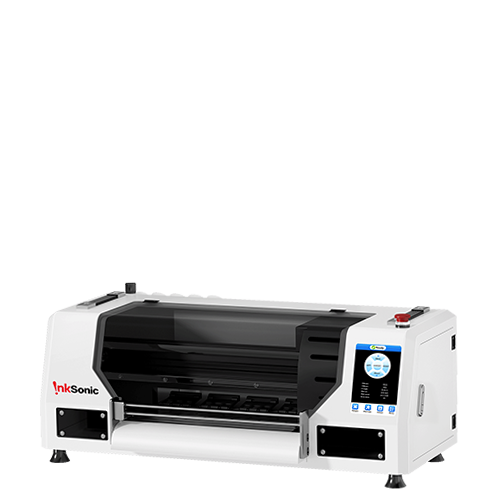


A 24 inch DTF printer—roughly the same market class as a 60 cm DTF printer—is built for commercial roll production rather than occasional one-off jobs. It makes the most sense when a shop already has regular apparel orders, gang-sheet demand, or transfer volume that can keep a wider printer and finishing line busy. For a business still testing demand, a smaller printer or outsourced transfers can be easier to manage.
The buying decision should not start with maximum speed or head count. Compare the production volume you actually expect, the printhead configuration, white-ink and maintenance systems, film handling, shaker-and-dryer capacity, software, support, and the total cost of putting the full workflow into operation. A faster printer only helps when the rest of the line can keep up.
Is a 24 Inch DTF Printer Right for Your Business?
A 24 inch DTF printer is most useful when print width, roll capacity, or production speed has become a limitation. The larger format works well for businesses producing gang sheets, multiple garment orders, wholesale transfers, or daily apparel jobs where reducing manual steps improves turnaround time.
However, a wider system is not automatically the right choice. It requires more workspace, higher consumable usage, and more maintenance than smaller machines. The decision should be based on your actual production needs rather than business size alone. For small batches of personalized shirts or chest logos that fit a 13-inch print area, consider the InkSonic Spark F13 as a smaller-format option.
Your Situation |
A 24 Inch DTF Printer Makes Sense When... |
Daily apparel production |
You regularly print orders and need more output without constantly reloading smaller film sizes. |
Gang sheet workflow |
You produce multiple designs or garments in one layout and want better film utilization. |
Wholesale or transfer sales |
You need consistent output for repeat customers and larger transfer batches. |
Growing production |
Your current printer creates delays because of print width, speed, or finishing capacity. |
Limited production demand |
A smaller printer or outsourced transfers may be more practical while order volume is still unpredictable. |
Limited workspace or maintenance time |
A larger system may add unnecessary complexity if it cannot be used regularly. |
What Should You Look for When Buying a 24 Inch DTF Printer?
Printhead Type and Configuration
Start with the exact printhead model and channel configuration, not just the number of heads. Ask how CMYK and white are assigned, which pass mode produces the quoted speed, and what changes in output or image quality when you switch to a higher-quality mode. The printhead name matters, but only in the context of the workload and configuration you will actually run.
Dual-, triple-, and four-head layouts can all make sense. More heads may increase throughput or separate color and white channels more efficiently, but they also add alignment work, maintenance points, and replacement cost. Before buying, confirm head pricing and availability, warranty coverage, and access to related service parts. A faster multi-head setup is a poor bargain if your volume cannot use the extra capacity or downtime is difficult to resolve.
White Ink Management and Maintenance Automation
White ink is central to DTF production and one of the main reasons maintenance design matters. Look for circulation or recirculation, agitation or stirring where applicable, automated cleaning, a reliable capping or wet-capping system, and procedures that protect the nozzles during short idle periods. These features reduce the chance that settled pigment or dried ink turns a normal startup into a recovery session.
Automation does not make the printer maintenance-free. Daily nozzle checks, capping-station and wiper cleaning, waste-ink monitoring, ink agitation, and the manufacturer’s shutdown or idle routine still matter. The useful question is how much of that routine the machine makes predictable—and how quickly the operator can recover when a nozzle check is not clean.
Film Feeding and Mechanical Stability
A 24 inch DTF printer can produce excellent color and still lose money through poor media handling. Check how the machine feeds the roll, controls tension, supports the film across the platen, and hands the printed film to the take-up or shaker. Stable tracking matters because wrinkles, skew, head strikes, and inconsistent film tension can interrupt a long gang-sheet run even when the printheads are working perfectly.
Useful mechanical features can include adjustable tension, vacuum or platen support, media sensors, secure take-up, and head-strike or anti-collision protection. None of these should be judged from a feature list alone. Ask to see the printer run a long roll and watch whether the media stays centered and flat from printing through finishing.
RIP Software, Color Management, and Support
The RIP controls more of the production workflow than simply sending a file to print. Confirm whether the license is included, permanent, or subscription-based; whether it supports nesting and gang-sheet layout; how it builds the white underbase; and whether the supplier provides usable ICC profiles or setup guidance for its ink and film combination. A repeatable profile is more valuable than a long menu of effects that you will rarely use.
Support belongs in the same buying decision. Check onboarding, training, warranty terms, spare-parts availability, remote troubleshooting, and expected response times. A lower purchase price loses its advantage quickly if a failed sensor, pump, cable, or cap top keeps the line offline for weeks.
How Much Production Capacity Do You Actually Need?
Rated speed is useful only when the test conditions are clear. Ask which pass mode, resolution, artwork coverage, and white-ink settings produced the number, then compare those conditions with your real jobs. A shop printing small left-chest logos will use film very differently from one filling 24-inch gang sheets with large full-front graphics.
Do not convert a square-foot or square-meter speed directly into “shirts per day” unless the calculation states design size, nesting efficiency, pass mode, uptime, and finishing assumptions. Powder application, curing, cutting, pressing, inspection, and order sorting can all become the limiting step. Aim for enough capacity to finish a normal busy day with room for reprints and growth, rather than buying the highest published speed in your budget.
Actual Work Pattern |
What to Validate Before Buying |
Likely Bottleneck |
Short daily custom runs |
Fast startup, clean nozzle recovery, simple job changes, low waste during short rolls |
Setup and maintenance time |
Several hours of printing per day |
Stable speed in the quality mode you will actually use; shaker/dryer can run at the same pace |
Finishing capacity |
Continuous gang-sheet production |
Long-roll tracking, RIP nesting, ink supply stability, predictable cleaning intervals |
Uptime and media handling |
Wholesale transfer production |
Sustained output, parts availability, operator coverage, spare consumables and service plan |
Downtime and fulfillment |
Multi-shift or very high-volume work |
Duty cycle, redundancy, environmental control, scheduled maintenance and backup plan |
Service and workflow resilience |
What Equipment Do You Need With a 24 Inch DTF Printer?
The printer is not a complete production system. A commercial DTF workflow still needs powder application, curing, transfer application, software, consumables, workspace, and maintenance support. Plan these pieces together so the finishing line, electrical setup, and operator workflow are ready for the output the printer is expected to produce.
Equipment |
Why You Need It |
|
Powder shaker |
Applies and removes hot-melt adhesive consistently across roll-fed transfers. |
|
Curing / dryer system |
Melts and cures the adhesive so the finished transfer is ready for application or sale. |
|
Heat press |
Applies the finished transfer to garments at the required time, temperature, and pressure. |
|
RIP workstation / software |
Handles artwork, white-underbase generation, nesting, profiles, and print queues. |
|
Film / ink / powder |
Core consumables; compatibility affects image quality, adhesion, and workflow stability. |
|
Workspace / electrical setup |
Supports the printer, shaker/dryer, ventilation, storage, safe material handling, and required power. |
|
Maintenance supplies / spare parts |
Allows routine cleaning and faster recovery from common wear-part failures. |
The printer and shaker/dryer need to be matched as one line. Do not stop at whether a bundle includes an automatic shaker; check its working width, feed speed, powder recovery, heating capacity, take-up system, and electrical requirements against the printer mode you plan to run. This becomes more important as head count and speed increase. If the finishing unit cannot cure film at the printer’s sustained output, it becomes the bottleneck and the extra print capacity is wasted.
How Much Does a 24 Inch DTF Printer Really Cost?
A 24 inch DTF printer refers to a print width category, not a fixed equipment level. Prices vary depending on printhead configuration, automation, included software, finishing equipment, and support. Before comparing prices, check whether the package includes only the printer or a complete production workflow.
System Type |
Typical Listed Price Range (USD) |
What Is Usually Included |
Printer-only |
Around 8,000–17,000 |
24 inch / 60 cm printer and core components. Shaker-dryer, heat press, shipping, and training may be separate. |
Printer + shaker-dryer |
Around 15,000–25,000 |
Printer with powder application and curing equipment for a more complete workflow. |
Higher-head-count production bundle |
Around 25,000–35,000+ |
Multi-head printer, shaker-dryer, RIP software, and additional production equipment or support options. |
Price checked: October 2026.
The printer price is only the beginning of the investment. A complete budget should include shaker-dryer equipment, heat press, RIP software, freight, initial ink, PET film, adhesive powder, cleaning supplies, spare parts, workspace requirements, and setup waste.
After launch, track film usage, ink and powder consumption, cleaning cycles, labor, maintenance, and downtime. A lower-priced machine may cost more over time if it creates more waste or interrupts production. For businesses, cost per sellable transfer is often more useful than the initial purchase price.
Which 24 Inch DTF Printer Configuration Is Right for You?
The right configuration should clear your expected workload with a reasonable margin and still be manageable for your team. Use production demand to decide where extra head count, automation, or support will actually improve the workflow.
Business Need |
Prioritize |
First commercial 24-inch setup |
Mechanical stability, strong support, reliable white-ink management, and a manageable head configuration |
Growing apparel shop |
Sustained throughput, matched automatic shaker/dryer, easy gang-sheet workflow, and parts availability |
High-volume gang sheets |
Faster head configuration, long-roll tracking, nesting efficiency, and high uptime |
Wholesale transfers |
Production speed, workflow automation, service response, consumable planning, and downtime resilience |
Limited technical experience |
Maintenance automation, training, remote support, clear documentation, and stocked wear parts |
Choose the least complex configuration that can comfortably handle your expected production with room for normal peaks and reprints. Add head count, automation, or finishing capacity only when your workload can use it.
24 Inch DTF Printer FAQs
Is a 24 Inch DTF Printer the Same as a 60 cm DTF Printer?
They generally refer to the same commercial width class. Twenty-four inches equals about 61 cm, while many machines are marketed around a 60 cm working or print width. Always check the manufacturer’s maximum media width and actual printable width because the advertised “24 inch” label does not guarantee that the full roll width is printable.
Is a 24 Inch DTF Printer Good for a Small Business?
It can be, but volume matters more than company size. A small transfer seller printing every day may benefit from 24-inch roll production, while a larger customization shop with occasional DTF orders may be better served by a smaller machine or outsourced transfers. Buy the width when it solves a real capacity or workflow problem.
What Printhead Is Best for a 24 Inch DTF Printer?
There is no single best printhead for every shop. Compare the required speed, pass mode, expected daily workload, image quality, head price, warranty, parts availability, and the supplier’s ability to support that configuration. A widely supported two-head setup can be a better business choice than a faster multi-head machine that is expensive or difficult to service.
How Many Shirts Can a 24 Inch DTF Printer Produce per Day?
There is no reliable shirt-per-day number without defining the design. Output changes with artwork size, pass mode, gang-sheet utilization, printer uptime, white-ink coverage, shaker/dryer speed, cutting, and heat-press capacity. Plan in printable area or completed gang sheets first, then convert that output into garment counts using your own average design size and production workflow.
Should You Pair a 24 Inch DTF Printer With an Automatic Powder Shaker?
For regular 24-inch roll production, usually yes. An automatic shaker/dryer makes continuous film handling practical, but it must match the printer's working width and sustained output. If curing or take-up cannot keep pace, the finishing line becomes the bottleneck.


