When you're serious about DTF (Direct-to-Film) printing, the software is as important as the printer itself. DTF RIP software will allow you to manage every aspect of your prints including accurate color, white ink management, layer controls and film-specific settings. RIP (Raster Image Processor) software for DTF allows you to transfer your designs onto film in a clean manner. It has all the tools needed to ensure accuracy, speed, and consistency in your printing, and is a step above any basic print software.
If you are a hobbyist, creating one-off designs, or a commercial printing business, there is an opportunity to optimize your business with it for DTF printing. You can make modifications to ink color profiles, film color profiles, white ink layering, control ink density, and control opacity, which enables your creativity to be translated into professional-grade transfers.
Why It Matters for DTF Printing
Without a specialized RIP solution, DTF printing can be challenging. Common issues such as color inaccuracies, variable ink deposit, ink bleed, and slow workflow can reduce your print's profitability and quality. That's where the best enters the picture.
With this software, you're in complete control of every element of the print. Good software ensures your prints maintain accurate color, crisp details, and correct white ink layering—even on blacks. It also saves ink, prevents errors, and keeps things running smoothly, which is especially worth it for shops with a high volume of orders to get through at a time. Choosing the optimal software for DTF delivers consistent output, minimizes waste, and maximizes overall performance.
Key Features to Look for in RIP Software
When selecting the ideal software for your DTF setup, certain features are essential. The best or Direct-to-Film typically includes:
White Ink Control and Underbase Creation – Allows precise control of white ink layers for opacity and color vibrancy on dark substrates.
Color Calibration and ICC Profile Support – Enhances color reproduction to your design's desired color shades.
Multi-Layer Print Management – Allows you to control complex designs with different ink layers efficiently.
Print Queue Control and Batch Mode – Controls a set of jobs to accelerate production and reduce downtime.
Print Preview and Scaling Options – Provides an on-screen view of the finished product, and resizing is possible before proceeding to print.
Professional-grade software for DTF possesses these features to distinguish itself from light-speed printing software and to make them necessary to provide high-end, consistent output.
Popular Options
There are several widely used solutions for DTF printing, each with its own strengths and compatibility considerations. Some popular options include:
CADlink Digital Factory – Offers robust color management and white ink control. Compliant with most DTF printers, it's known for reliability in a commercial setting.
Wasatch SoftRIP – Provides batch processing, ICC profile support, and precise control over multi-layer prints and is a favorite among medium-to-large print shops.
From Printer Manufacturers – The majority of DTF printer manufacturers have their own software for their models. They are simple for novices to operate but may lack some advanced features.
When selecting software, functionality, user-friendliness, and compatibility with your DTF printer have to be traded off against one another. The best DTF software will be a function of your volume of production, workflow, and design complexity.
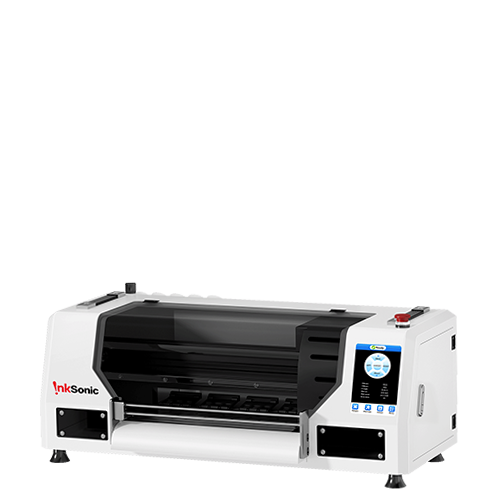
Buy an InkSonic DTF printer and be guaranteed to receive high-quality, original prints with your printer. You can start printing together immediately, worry-free about compatibility, color consistency, or workflow issues.
Allowing for precise color profiles, easy multi-layer design handling, and accurate white ink management. By choosing an InkSonic printer with original software, you eliminate the usual frustrations of trial-and-error setup and third-party software, and get professional, consistent results right from the first day.
How This Software Enhances Your DTF Workflow
Integrating software into your printing process transforms the way you produce transfers. Key benefits are:
Fewer Errors and Misprints – Complete control of white ink by layers, color profiles, and ink density eliminates costly mistakes.
Optimization of Ink Usage and Avoidance of Waste – Effective usage of ink saves material expense and enables eco-friendliness.
Increased Print Speed – Batch printing and print queue management provide increased throughput for hobbyists as well as commercial shops.
Improved Color Integrity – Especially critical when printing onto dark-colored substrates, where white underbase and ink opacity are critical.
For example, when printing a multi-colored logo on a black T-shirt, the best software for DTF allows you to automatically create an underbase layer of white ink, control each color layer separately, and preview what you will end up with as the final product before uploading it to be printed.
Integration with Other DTF Equipment
It is only one of a complete Direct-to-Film workflow. To be as efficient as possible, and to achieve the best possible print quality, it must complement other equipment, including:
DTF Printers – Allows the software to directly communicate with the printer in order to adjust color, white ink, and resolution settings.
Heat Presses and Curing Ovens – Keeps the printed film when transferred adhered to the fabric so tightly.
Powder Stations and Film Handling – Helps your adhesive powder application process to maximize print adhesion and wear.
By integrating your software for DTF printing with your hardware configuration, you will be able to produce a streamlined, professional-grade printing station that is less likely to crash and put you in the red.
Common Questions About RIP software for DTF
Can I use it with any DTF printer? Most packages support a wide range of printers, but manufacturer support must be confirmed. There are some printer models with their own proprietary software tuned for their printers.
Does it improve print quality on dark substrates?
Yes. The best software for DTF supports white ink accuracy control and underbase creation, which is required for opaque, bright prints on black shirts.
Why would one software be better than another for DTF?
Look for features like ICC profile support, batch printing, white ink control, layer management, and print preview capabilities. How these tools are integrated determines the extent to which a software streamlines workflow, conserves waste, and maintains color accuracy.
Conclusion
Whether you're an amateur designer or a business print shop, the perfect software coexists beautifully with your printer, heat press, and media to produce vibrant, long-lasting transfers. Browse our selection of DTF printers and accessories to pair with your software and complete your full, professional printing system. Using the proper tools, workflow, and rip software for DTF printing, you'll take your Direct-to-Film designs to new levels.
Buying software is required for an individual who is serious about Direct-to-Film printing quality. Using the proper RIP software for DTF, you can have precise color control, a stable white layer of ink, and a smooth workflow management.









 USB Dongle - InkSonic RIP Software
 USB Dongle - InkSonic RIP Software for C13/E13/L8/L13


