




If you’ve ever browsed printing forums or YouTube tutorials, you’ve probably seen people talking about the “ best printer to convert to DTF.” The idea sounds simple — take a regular inkjet printer, load DTF ink, and start printing transfers. It seems like a clever way to save money, especially for beginners or small business owners starting out in custom apparel printing.
But what does DTF conversion actually mean?
In brief, DTF conversion is the act of converting a regular inkjet printer — typically models like the Epson L1800, L805, or XP-15000 — to directly print on PET transfer films using DTF inks, which include white ink. They can include roller removal, adding an ink circulation system, and installing new software.
Although this DIY approach would work for hobbyists, it would never work for anyone who has a printing business. Year-round reliability, consistent color, and technical support are necessary with professional DTF printing — all things that are hard to come by with a repurposed printer.
Many beginners wonder what the best printer to convert to DTF is — but before you start taking apart a desktop printer, it’s worth understanding what you’re trading off. While conversions seem affordable, a real DTF printer gives you stable output, longer printhead life, and professional support that DIY setups can’t match.

Common Printers People Try to Convert
When searching for DIY DTF setups, you’ll often see the same few printer models mentioned:
Epson L1800 (A3 size, popular for DTF conversions)
Epson XP-15000 / XP-600
Epson L805 / L800
Epson P600 / P800
These printers are selected for their 6-color ink configurations and high-volume printing, that give an impression that they are best suited for DTF transfers. They're also relatively low-cost and readily available — ideal for a first go-round at the experiment.
The typical DTF printer conversion process includes:
Installing pigment-based DTF inks (CMYK + White)
Replacing dampers and removing paper feed rollers
Adding white ink lines and sometimes a DIY circulation pump
Using third-party RIP software to manage color profiles
While tutorials make it look easy, the truth is that DTF modification isn’t as straightforward — or as budget-friendly — as it appears.
The Hidden Costs and Risks of Converting a Printer to DTF
If you’re serious about starting a printing business, these hidden risks are worth understanding before you invest in a DIY DTF conversion.
Printer Damage Risk
DTF ink, especially white ink, is thicker than standard dye or pigment ink. It can easily clog printheads not designed for it. Once clogged, printheads are difficult or impossible to repair — meaning you might lose your entire investment.
No Warranty or Technical Support
Once you modify an Epson printer, the warranty becomes void. If anything breaks — from the printhead to the mainboard — you’ll have to troubleshoot and repair it yourself.
Ink Flow & White Ink Problems
White ink contains heavy pigments that settle quickly. Without a white ink circulation system, these pigments cause clogging and uneven printing. This is one of the main reasons most DIY setups fail within a few months.
Software Limitations
Converted printers rarely integrate smoothly with professional RIP software (like Acrorip or Cadlink). This leads to inaccurate colors, wasted film, and time-consuming adjustments.
Inconsistent Print Quality
Environmental factors like temperature and humidity can easily affect the operation of a converted printer. Prints may be good one day and streaked the next. For production uses, this inconsistency is a significant hurdle.
Why Buying a True DTF Printer Is the Smarter Choice
If you plan to print professionally — even at a small scale — a purpose-built DTF printer is a much smarter investment. Here’s why.
Easy Setup
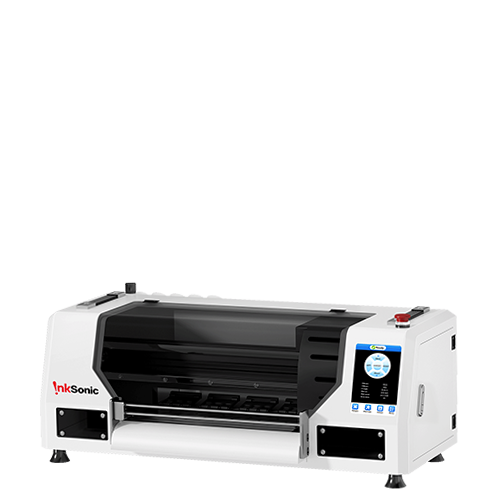
Professional printers like the InkSonic XP600 U13 come preconfigured for DTF use. You get:
A built-in white ink circulation system
RIP software pre-calibrated for accurate colors
Ink tank system optimized for DTF ink flow
Integrated heating and curing support
You can start printing right out of the box — no risky modifications required.
Optimized Ink Flow & White Ink Stability
Real DTF printers use white ink stirring motors and circulation pumps to keep pigment evenly mixed. This prevents the clogs and streaks that plague converted printers.
Reliable Output & Longer Lifespan
Every component in a professional printer — from printhead to film feed — is built for DTF printing. The result? Consistent print quality, longer printhead life, and less downtime.
After-Sales Support
When you buy a dedicated DTF printer from InkSonic, you get access to:
Technical support
Replacement parts
Troubleshooting assistance
That’s peace of mind no DIY conversion can offer.
Real Cost Comparison: Conversion vs. Ready-Made
Setup Type |
Initial Cost |
Maintenance & Repair |
Lifespan |
Print Quality |
Support |
DIY Conversion |
$300–$600 |
High (frequent clogs) |
Short (3–6 months) |
Inconsistent |
None |
Professional DTF Printer |
$1,000–$3,000 |
Low (stable ink system) |
Long (2–3 years) |
Professional-grade |
Full after-sales support |
While it might seem cheaper to convert an Epson printer, the indirect costs of downtime, repairs, and material waste soon mount up. Ultimately, you save time, ink, and frustration by investing in a printer that is specifically made to be a DTF printer — so you can focus on growing your business instead of fixing machinery.
Recommended Models for Beginners
If you’re just starting your DTF journey, here are two great options designed for easy setup and professional-quality prints:
Compact and beginner-friendly, this model includes white ink circulation and stable color output, perfect for small studios or home-based printing setups.

Ideal for business-level production, it offers faster printing speeds, dual printheads, and high-resolution output for vibrant, detailed designs.

Skip the trial and error — start printing confidently with InkSonic DTF printers built for quality, stability, and reliable support.
Conclusion
While it is reasonable to seek out the best printer to retrofit to DTF initially, the wiser move for any serious businessperson or artist is purchasing a real DTF printer. Specialty models have whiter colors, fewer maintenance problems, and specialty after-sales service — all you'll require to build a good, profitable custom printing business.
Explore InkSonic DTF Printers and start printing with confidence today.


