




If you’ve ever wanted to start your own t-shirt brand or cater to the crowsourcing needs of small businesses and events, now is the time. The custom T-shirt market is booming and with a few pieces of equipment to make shirts, anyone can turn creativity into a fortune.
If you’re looking to produce shirts at home or a small studio, learning what gear to get — and why — is a good first step on the road to success. In this article, we will take a look at the essential tools to make your own shirts, how DTF (Direct-to-Film) printing works and why it is the best solution for t-shirt printing.

Why Start a Shirt Printing Business?
Customized apparel is everywhere — from brand merch and uniforms to event giveaways and online store products. With the rise of e-commerce and social media marketing, even a small studio can reach global customers.
Starting a shirt printing business doesn’t require a large upfront investment anymore. Instead of spending thousands on traditional screen-printing setups, you can achieve high-quality, full-color prints using compact, affordable DTF printers.
That’s why entrepreneurs and crafters alike are turning to DTF technology — it’s flexible, easy to learn, and works on nearly any fabric type.
What You Need to Print Shirts
Before you can start printing, you can buy a basic DTF shirt-printing setup before you can begin printing. Each part is essential, from the design creation to the final heat press transfer.
Let’s deconstruct what is necessary:
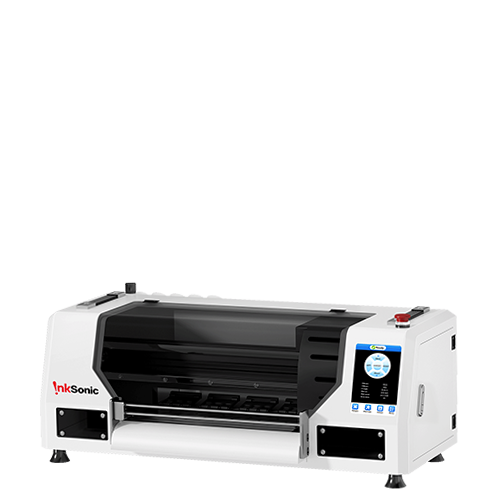
DTF Printer — The Heart of Your Setup
A high quality DTF printer prints your design directly on to a special PET film with textile inks.
A white ink DTF printer lets you have bright colors on dark garments, as the white layer functions as a base layer for the CMYK inks.
Important features to consider:
Constant white ink circulation system (to avoid clogging)
High-resolution printhead for fine detail and color accuracy
Reliable RIP software for color control and layer management
Recommended option: The InkSonic L1800 DTF Printer is one of the best models for beginners and small businesses. It produces brilliant, durable prints and is backed by InkSonic’s expert after-sales support — perfect for turning shirt designs into a professional product line.
DTF Film (Transfer Film)
The printed design doesn’t go directly onto the shirt. Instead, it’s first printed onto a DTF transfer film.
This film is coated to hold the ink in place until it’s transferred to fabric with heat. You’ll find both cold peel and hot peel films — the choice depends on your workflow speed and finish preference.
Tip: Use high-quality PET-based DTF film for sharper colors and easier peeling after pressing.
DTF Ink
DTF printing uses pigment-based textile inks, which bond permanently to fabrics once heat-pressed.
You’ll need:
- CMYK inks for color
White ink for the underbase layer

Ink quality affects vibrancy and durability, so investing in reliable DTF ink is crucial. Poor-quality inks can lead to fading or nozzle clogging.
Related reading: Learn why a high-performance white ink pump is vital for consistent print quality in InkSonic’s article Why Your DTF Printer Needs a High-Performance White Ink Pump.
DTF Adhesive Powder (Hot Melt Powder)
Once your design is printed on film, it needs a special adhesive powder to help the ink stick to the fabric.
You simply:
Sprinkle powder evenly over the wet print.
Shake off the excess.
Cure the film using a heat press or curing oven.
This stage guarantees that the design is effortlessly transferred and will withstand laundering.
Insider secret: When using high quality adhesive powder, the prints will be soft, flexible and feel great on shirts made from 100% cotton, polyester or a blend of both.
Heat Press Machine
A heat press is required to adhere the DTF print to the shirt. A heat press applies the right amount of time, heat and pressure to melt the adhesive powder so that it adheres permanently to the shirt
Typical settings:
Temperature: 160–170°C
Time: 15–20 seconds
Pressure: Medium to firm
Recommended product: The InkSonic Dual Platen 16×24 Inch Heat Press delivers even pressure and consistent temperature for flawless transfers, even on thicker garments like hoodies or sweatshirts.

Design Software & RIP Software
Before printing, you’ll need to create or adjust your artwork using design software such as:
Adobe Illustrator
CorelDRAW
Photoshop
Then, you’ll process it with RIP software (like Maintop or Acrorip) to manage ink layers and color output. The RIP software ensures that the white underbase prints perfectly beneath your CMYK design — critical for vibrant, professional results.
Optional Accessories for Efficiency
Once you’ve mastered the basics, a few add-ons can help improve your workflow:
Curing oven for faster powder curing
DTF fume extractor for safety during curing
T-shirt alignment tools for precise placement
Extra DTF film rolls and ink storage containers for continuous production
Why Choose DTF Printing for Your Shirt Business
While there are several shirt-printing methods (like sublimation, heat transfer vinyl, or screen printing), DTF offers the best balance of quality, cost, and versatility.
Here’s how it compares:
Feature |
DTF Printing |
Sublimation |
Vinyl |
Screen Printing |
Works on any fabric color |
✅ Yes |
❌ No |
✅ Yes |
✅ Yes |
Works on cotton/poly blends |
✅ Yes |
❌ No |
✅ Yes |
✅ Yes |
Requires pre-treatment |
❌ No |
❌ No |
❌ No |
✅ Yes |
Durability (wash fastness) |
✅ Excellent |
✅ Good |
⚠️ Medium |
✅ Excellent |
Startup cost |
💰 Medium |
💰 Low |
💰 Low |
💰 High |
Ease of use |
✅ Easy |
✅ Easy |
⚠️ Moderate |
❌ Complex |
As you can see, DTF printers make shirt production easier, faster, and more profitable — even for small shops or home-based businesses.
Step-by-Step: How DTF Printing Works
Design your artwork in your preferred software.
Print the design on DTF film using CMYK + White inks.
Apply DTF powder evenly to the wet print.
Cure the film (via heat press or oven).
Transfer the print onto a shirt using your heat press.
Peel the film and admire your professional-quality shirt!
The process is simple, repeatable, and ideal for both custom one-off designs and bulk production.
Complete DTF Equipment Bundle from InkSonic
Instead of sourcing each component separately, you can save time and ensure compatibility with an InkSonic DTF printing bundle.
Each package includes:
A high-performance DTF printer
DTF film rolls
CMYK + white inks
Adhesive powder
RIP software
Optional heat press

InkSonic printers are supported by real technical assistance and warranty coverage — helping new shirt business owners get professional results from day one.
Conclusion
Starting a t-shirt printing business can be easy and affordable. By using the appropriate equipment to produce shirts, it is possible to print bright, long lasting images on just about any material.
By purchasing a DTF printer kit, you will receive:
Professional print quality
Lower startup costs than screen printing
Flexibility for both light and dark fabrics
Reliable long-term support from InkSonic
Whether you’re printing shirts for local clients, online sales, or your own fashion brand — the key is having dependable equipment that grows with your business.
So, if you’re ready to turn your creativity into a thriving venture, start with the InkSonic DTF printing system — your complete solution for high-quality, custom shirt production.


