




Printing designs on black and dark-colored shirts has always been tricky. Most traditional methods, like screen printing or sublimation, leave a lot to be desired - they usually involve heavy white underbases, can't provide lots of vibrant colors, or they limit what fabrics you can print on. That's where Direct-to-Film (DTF) printing has arrived!
DTF printing method has become one of the best, most reliable, flexible, and economical ways to print on dark-colored products. Whether you are a business owner, custom shop owner, or hobbyist, learning about the process of how to print on black shirts with DTF will enable you to provide the vibrancy, durability, and the professional-grade finish that your customers expect from you.
This guide shares everything you need to know from the preparation of the design all the way to troubleshooting to make strong permanent prints on any dark surface.

Why DTF Printing is the Perfect Solution for Black and Dark Fabrics
Dark or black shirts can be difficult to print. If you have ever tried the traditional way with screen printing or sublimation, you know what I mean—diluting colors into the material, limitations on materials, and costly setup. That's exactly why so many creatives are turning to DTF printing.
Vivid Colors that Pop
Perhaps the hardest aspect of working with dark material is making colors stand out. DTF remedies this beautifully with its white underlayer, which serves as a primer.
That way, even pale hues—pastels, neons, or soft gradients—do not dull down on black fabric. No fading reds, no muffled yellows. Your artwork is just as bold on a black hoodie as it is on a white tee.

Sharp Details
Ever tried printing fine text or intricate artwork on a dark shirt, only to see it blur or lose sharpness? With DTF, that problem disappears. The technology handles everything from tiny linework to smooth gradients with precision. Whether it’s a complex logo, a detailed illustration, or a photographic print, the results are consistently crisp and professional.

Fabric Versatility
With many traditional methods, you’re locked into specific fabrics—sublimation works only on polyester, for example. But DTF doesn’t play by those rules. It works just as effectively on cotton, polyester, and blended fabrics, making it one of the most versatile print methods available. No matter if you are customizing cotton streetwear, athletic jerseys, or tote bags, one DTF setup can do the whole thing.

Durability
A great print is worthless if it cracks or washes out after a few washes. Luckily, DTF transfers are intended to last. When pressed and post-cured correctly, DTF transfers are resilient and will not fade, peel or crack after washing them time and time again. Customers love the idea that their custom tee or hoodie will look as good family on the tenth wear as it did on day one.

Cost-Effective
Finally, let’s talk about value. Screen printing requires screens, setup time, and a minimum order to make it worthwhile. DTF, on the other hand, is ready for short runs and one-off designs.
No screens, no preparation costs, no wasted ink. While you might be printing a shirt here or there for a customer, regardless if you’re bulk-printing 50-for-a-job shirts at an event, prices can’t disrupt business and DTF helps keep the costs down while helping your margins stay fatter.

Preparing Your Design
The key to a great print is a well-designed design. So start with carefully selecting your colors to ensure they look bright and professional against the dark background.
1. Use the Right Resolution
Always design at 300 DPI or higher for crisp, detailed results.
Low-resolution files will appear pixelated, especially on large prints.
2. Choose the Correct Color Mode
Start in RGB to work with bright, digital colors.
Convert to CMYK before printing, or let your RIP software handle color conversion.
3. Select the Best File Type
Vector files (AI, EPS, SVG) are best for logos and text because they can be resized without compromising quality.
High-resolution raster files (PNG, TIFF, PSD) are best for photographs or complex artwork.
When saving your work as a PNG, select transparent background to eliminate unwanted edges.
4. Consider the Contrast of Your Design
If your background is dark, then use light and bold colors.
Use a black canvas within your design software to check your contrast.
5. Add a Bleed Area
Extend your design slightly beyond the intended cut line to prevent white outlines after pressing.
6. Optional: Use Halftones
- To get fine gradients and to have less stiffness in the great solid, continuous-tone process should be used.
By following these steps, your prints will be bold and bright on black tees.
Preparing Your DTF Transfers
Once your design is ready, it’s time to create your transfer.
Print onto DTF film using specialized inks.
Apply adhesive powder evenly while ink is still wet.
Cure the transfer using a curing oven or heat press (without pressure) at the recommended temperature and time.
A properly cured transfer will be ready for pressing, with no sticky patches or uncured powder.
Preparing the Garment
Your shirt preparation is just as important as the transfer itself.
Select garments that are lint and dust free.
Pre-press your shirt for 5–10 seconds to remove moisture and wrinkles.
Lay your shirt flat out and place your transfer properly.
Use heat resistant tape and stick the transfer to it,If needed.
This is to get a flat surface for good adhesion when it attaches, preventing peeling.
Heat Press Application
Correctly applying transfers.
Temperature: 320–325°F (160–163°C)
Time: 15–20 seconds
Pressure: Medium to firm: Make certain that design gets good contact.
Protective Layer: A sheet of PTFE or parchment is used to reduce burning and provide even heat distribution.

After pressing, follow your film type’s instructions for peeling.

Post-Pressing and Finishing
For added durability and a smoother finish, always post-press your design:
Cover the print with a Teflon sheet.
Press again for 5–10 seconds.

This final step helps lock in the adhesive, enhances wash resistance, and gives the print a soft, matte finish.
Tips for Best Results
Test Print: Always do a test print on the same black shirt before a full production run.
Use Good Quality Material: Use quality film, inks, and powders. Cheap or bargain supplies will cause fading and adhesion problems.
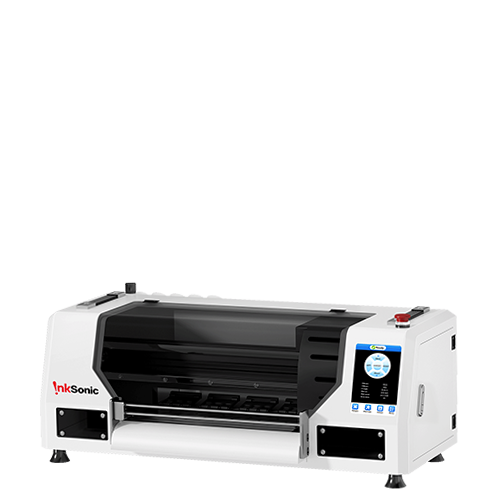
Buy a Good Printer: Even though a good DTF printer is an investment, it will give you more attractive prints which can withstand the test of time. The InkSonic T-shirt maker machine, for instance, is popular among beginners and professionals who desire reliable quality and vivid colors.
Store Transfers Properly: Keep them flat and in a cool dry space to ensure the quality of adherent.
Keep Equipment Working: Clean heat plate surface often, check accurate temperature, and be careful in handling powders to avoid clumping.

Troubleshooting Common Issues
Even experienced printers encounter problems sometimes. Here's how to diagnose them:
Print not sticking: Re-temperature and re-pressure test; ensure that the shirt was pre-pressed.
Colors are dull: Utilize higher-quality inks or have your design in CMYK.
Visible edges on black shirts: Use black DTF powder and transparent backgrounds.
Cracking or peeling: Make sure the transfer was fully cured and properly post-pressed.
Conclusion
Printing on dark and black fabrics doesn’t have to be hard. With DTF printing, it is possible to have vibrant results on many of the most popular garment colors in the market.
Do your design proper, use a quality material and press it on correctly the 1st time and you have prints that not only look great, but will last in the wash & wear.


