









Why Print Head Alignment Is Critical
When it comes to achieving flawless DTF (Direct-to-Film) prints, print head alignment is one of the most important — yet often overlooked — maintenance steps. Proper alignment ensures that the printer’s nozzles spray ink precisely where it should go, layer by layer.
A misaligned print head can cause a range of frustrating problems such as:
Visible banding or horizontal lines in prints.
Fuzzy edges and loss of detail.
Ghosting effects, where shadows appear behind images.
Uneven colors, especially when layering white ink under CMYK.
When your print head is in perfect alignment, every droplet will land in a precise manner on the DTF film. You will have a smooth, sharp, and highly vibrant print — ready to transfer perfectly.
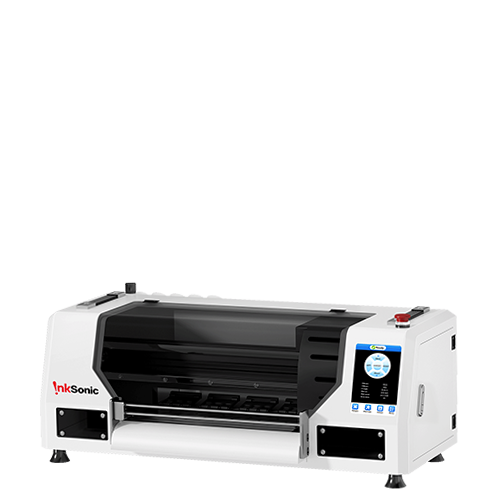
Given that even higher-end DTF printers like the Inksonic and the L1800, F1080, and a C13/E13 also require calibration to keep them running their best, be sure to align regularly to also help your print head stay healthy and stay consistent in color on every job.


What Causes Misalignment
There are several factors that can throw off your DTF printer’s alignment over time:
Shaking during transport or installation may loosen internal components.
Carriage rail calibration errors cause the print head to travel unevenly.
Temperature or humidity changes can subtly affect ink flow.
Non-standard DTF film thickness or incorrect platen height alters the printing distance.
For visual learners, you can compare your print to a nozzle check pattern — a good example shows crisp, evenly spaced lines, while a misaligned pattern shows overlaps or gaps.
Note:
If your DTF printer model is C13 or E13, follow the calibration steps below for manual alignment.
If you are using U13, U13D, or H13 models, manual calibration is not required as these models perform auto-alignment internally.
Step-by-Step Guide: How to Align a DTF Print Head
Step 1: Print a Test Pattern
Run a nozzle check and print head alignment pattern via your printer driver or RIP software.
Examine the test print carefully. Look for misaligned lines, gaps, or offsets between the white and color layers.
If the printed lines appear uneven or color layers don’t overlap properly, continue to the next step.
Step 2: Calibrate Horizontal Misalignment (White vs. Color)
1. Clean the raster bar
Turn off the printer.
Use a cotton swab dipped in alcohol to gently wipe the raster strip (the transparent plastic strip behind the carriage).
Wait five minutes for it to dry before turning the printer back on.
Then, print a test pattern again.
2. Match white and color resolutions

Ensure that the white and color ink resolutions in your printing software are consistent.
If these resolutions differ, horizontal misalignment can occur between the two layers.
(Refer to the provided image in your user manual or Inksonic support guide.)
Vertical White and Color Misalignment
1. Clean the raster disk
Turn off the printer.
Use a cotton swab with alcohol to clean the raster disk (the round sensor disk connected to the carriage motor).
Wait five minutes, then turn the printer back on.
Print a test pattern again.
2. Match white and color resolutions again

Confirm that white and color ink resolutions are set identically to ensure accurate overlap between layers.
Other Calibration Situations
If you still notice uneven printing:


Check that Printout-size Revision parameters in your software are set to:
- Horizontal Size: 300 mm
Vertical Size: 500 mm
Make sure the DTF film remains flat during printing — avoid curling or arching.
If after these steps the white and color layers still do not fully align, contact Inksonic technical support for assistance.
Step 3: Re-Test and Confirm
- Run a final test pattern.
Inspect the lines — they should appear straight, continuous, and evenly aligned.
Test both uni-directional and bi-directional printing to ensure consistent results.
Once alignment is achieved, you’ll notice a significant improvement in color layering, sharpness, and smooth gradient transitions.
Common Print Head Alignment Problems & Fixes
Problem |
Likely Cause |
Solution |
Horizontal banding |
Uneven bi-directional alignment |
Re-run alignment and reduce print speed |
Color shadows |
Misaligned CMYK/White channels |
Align each color layer manually |
Blurry edges |
Head too far from film |
Adjust platen height |
Gaps or missing lines |
Clogged nozzles |
Perform nozzle cleaning before alignment |
Things to Remember for Preventive Maintenance:
You don’t want to think of printer alignment as a once a year calibration thing.. develop some habits to your workflow like checking alignment with regularity after cleaning cycles or changing ink cartridges.
- Do not shake or tilt the printer; just keep the printer on a flat stable surface.
Avoid shaking or tilting your printer — keep it on a level surface.
Control humidity and temperature in your workspace to prevent ink drying or nozzle clogs.
Always use original Inksonic DTF inks and films, designed for consistent ink droplet size and optimal adhesion.
Schedule routine maintenance every few weeks for professional users or after long periods of inactivity.
Frequent cleaning of the printhead or a clogged printhead can lead to poor print quality or missing colors.
When to Seek Professional Help
If you still experience:
Persistent banding or ghosting after multiple alignments.
Uneven color layering even with correct settings.
Visible hardware issues (e.g., bent carriage rail or dirty encoder strip).
It may be time to contact Inksonic’s after-sales service.
From detailed calibration or part replacements, their professional technicians can help restore your printer's precision performance with a full diagnostic inspection.
Conclusion
A print head that is in good alignment is the secret to every vibrant, high quality DTF transfer. From one-of-a-kind shirts to big batch jobs, print head alignment maintenance on your Inksonic DTF printer ensures that it continues to produce the crisp detail and color depth your business depends on.
If you’re unsure about your printer’s alignment or print quality, contact Inksonic’s support team for expert guidance and maintenance assistance. Keeping your printer in top shape means every print will meet your highest standards — from film to fabric.


