




Stickers are ubiquitous - found on laptops, water bottles, packs, notebooks and even cars. They are interesting, colorful and provide myriad ways to express creativity and/or build a brand. From a DIY craft person designing stickers at home to an online seller on Etsy or Shopify, one needs the best sticker printer for professional outcomes.
However, with the multitudes of printers available today (inkjet, laser, eco-solvent, even the modern UV DTF printers) which one to choose becomes a challenge.
This guide breaks down the best things to think about, most appropriate printer models, and tips so that you can print stickers confidently.
Why Having the Right Printer Matters to Stickers
At first glance, you might think any desktop printer can handle stickers. Technically, many can. However, producing stickers is more than just printing on a paper substrate — it's about print quality, durability, and material compatibility.
An office inkjet will produce a nice print of the sticker design, but when stickers are subjected to water (or sunlight), they smear, fade, or peel.
Therefore, a specialty printer that produces high-resolution graphics or use durable inks will produce a sticker that lasts — and looks much better.
The right printer helps you:
Produce vibrant, sharp colors
Print on specialty sticker papers (glossy, matte, transparent, vinyl)
Save money with efficient ink usage
Scale up production if you want to sell stickers
Essential Considerations Before Purchasing
When choosing the best printer for making stickers, keep these features in mind:
1. Print Technology: Inkjet vs. Laser vs. UV DTF
Inkjet Printers – Ideal for brightly colored, photo quality prints, best suited for hobbyists and crafters.
Laser Printers– Good for reviews with text or simpler sticker designs, best for higher volume, lower cost situations.
UV DTF Printers – Professional choice to print waterproof, scratch-resistant, and durable stickers.
2. Print Resolution
Measured in DPI (dots per inch). For stickers, 1200 DPI or higher is ideal for crisp lines and detailed images.
3. Paper/Media Compatibility
Look for printers that support a wide range of sticker papers, including vinyl and specialty films.
4. Print Size
Do you want to make small planner stickers, or larger decal-sized prints? Check max paper size (A4, A3, or larger).
5. Ink Costs & Maintenance
Some printers may be affordable upfront but expensive to maintain. Consider refillable ink systems or eco-tanks.
Best Printers for Making Stickers: Top Categories
Here’s a breakdown of printer types, with recommendations for each.
1. The Best Value Inkjet Printer
Most beginners gravitate toward inkjet printers. They produce vibrant, high quality prints and function well with most sticker papers.
Pros:Affordable, good color accuracy and nice for a hobby.
Cons: Less durable for outdoor use unless laminated.
Awesome for: Crafters, kids’ projects, small Etsy shop.
Recommended Model: Epson EcoTank ET-2800 (refillable tanks can lower your cost for ink)

2. Top Laser Printer for Stickers
Laser printers utilize toners rather than ink, making them a more economical printing option and an overall better choice for high-producing content. Though they won't be the best option for glossy photo sticker paper, they are perfect for matte labels, planner stickers, and bulk designs.
Pros:Speedier prints, a better long-term investment, fairly durable against smudging
Cons: Less media compatibility than an inkjet printer
Best for: Bulk production, business labels, organizational stickers
Recommended Model: HP Color LaserJet Pro M283fdw.

3. Best Wide-Format Inkjet for Larger Stickers
If you want to print large stickers, wall decals, or full-sheet designs, a wide-format printer is the way to go.
Pros: Prints up to 13x19 inches, vibrant color reproduction
Cons: Higher initial investment, bigger footprint
Great for: Custom decals, small businesses scaling up production
Recommended Model: Epson Expression Photo HD XP-15000.

4. Professional Selection: UV DTF Printers
Let's discuss the forefront mind blowing choice: UV DTF printers. UV DTF printers are becoming increasingly popular among professional sticker makers.
Toward something else with your sticker production, we recommend a UV direct-to-film printer.

How UV DTF Printers Are Excellent for Sticker Making
UV Direct-to-Film printers are making the traditional sticker production process a thing of the past. Instead of lasers or inkjet printers which rely on liquid inks, UV printers utilize a UV-curable ink that is cured (dries or is set in place) immediately upon exposure to UV light, allowing for waterproof, durable, and bright prints.
Benefits of UV DTF Printers for sticker making
-
Unmatched Durability
Stickers are waterproof, scratch-resistant, and UV-protected.
Perfect for outdoor applications like car decals or shop signage.
-
High-Quality Finishes
Prints are vibrant, detailed, and crisp — with options for glossy or textured finishes.
White ink support makes it possible to print on clear and dark films.
-
No Lamination Required
Traditional inkjet stickers often need lamination to prevent smearing or fading.
UV DTF prints are ready to use right off the printer.
-
Material Versatility
Works on PET film, vinyl, and even directly on products (mugs, acrylics, metal, glass).
Expands beyond stickers to custom merchandise.
-
Cost-Effective for Small Businesses
Cuts outsourcing costs for professional-grade stickers.
Ideal for Etsy/Shopify sellers or local businesses.
Use Cases for UV DTF Stickers
- Premium brand labels for packaging
Outdoor-ready decals for vehicles and signage
Decorative laptop and water bottle stickers
Customized promotional items

Things to Think About Before Handing Out Money
More upfront cost compared to an inkjet printer
Needs proper care and handling
Ideal for micro entrepreneurs and developed clientele, excludes casual hobbyists alike.
In the case where you are serious about your sticker production and desire sleek and elegant prints that last for years without losing quality, then a UV DTF printer as a decal printer, would be a wonderful addition to your collection.
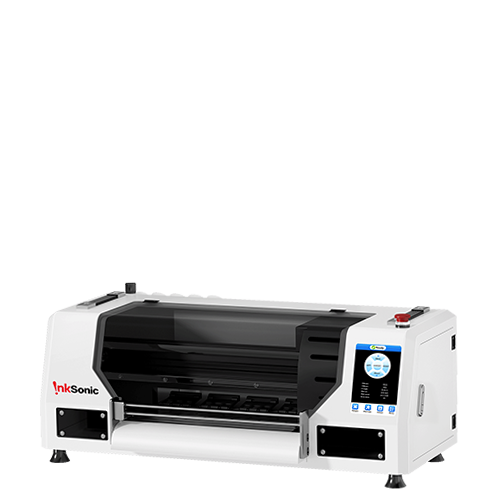
Recommended Model: InkSonic VF13.

Which Printer Would Be More Suitable for A Hobbyist Vs A Professional?
A compact and inexpensive printer would be a good starting point and a good addition would be a laminator in case some extra durability is required.
Here’s a quick guide to help you decide:
For the beginners or home business:
Start with a budget inkjet printer. Add a laminator for extra durability if needed.For Small Businesses:
Consider a wide-format inkjet or a laser printer for higher volumes.For Professionals & Etsy Sellers:
Invest in a UV DTF printer for unbeatable durability and the ability to expand to other products.
Sticker-Making Tips for Beginners
Even the best sticker printer won't stand out unless you combine it with the correct process. Here are some quick tips:
Select the correct sticker paper: Glossy, matte, transparent, or vinyl based on your project.
Print test pages first: Adjust color profiles and margins to avoid wasting material.
Use a cutting machine (optional): Silhouette or Cricut is utilized to cut stickers precisely.
Seal or laminate (if not using UV DTF): Protects inkjet stickers from water and scratches.
Conclusion
In conclusion, the best printer for making stickers will be determined off of your particular living situation.
If you are a casual or hobby printer, look into a budget inkjet printer like the Epson EcoTank series of printers. A laser printer may be the best option for the business who produces paper in what would be considered relatively high amounts, as it will be considerably more efficient and inexpensive. The clear winner becomes a UV DTF printer if you are a professional, or always creating premium stickers- you will produce the greatest quality, all round durability, for your situation.
No matter the setup that you want to go with based on the list of expectations, once you understand what to look for in a sticker printer, you can then produce almost anything you want. You can expand from simple at home/ DIY projects to then setting up a sticker business. The world is your oyster, even more now that you know the setup you choose is what works best for you!
FAQ
1. Can you print stickers from a regular printer?
Yes, you can as long as you have the right type of sticker paper. Results may vary using a standard printer and you may even use a laminator, depending on the sticker paper used.
2. Do you need special ink to print stickers?
No. But, pigment inks have a lot more durability than dye inks. Additionally, UV DTF printers will produce the most durable stickers.
3. What is the cheapest option to print stickers at home?
If you're just starting, a budget inkjet printer with refillable ink tanks will be the base cheapest option.
4. Is a UV DTF printer worth having for sticker printing?
Yes, if you are running a small business, or handing stickers out for heavy/repeated usage.


