









If you're looking into specialty T-shirt or cloth printing, chances are you've come across the term DTF (Direct-to-Film) printing — and now find yourself asking, what printer do I use for DTF printing?
One of the most common questions for someone who is new to the business but wishes to own their own printing company. The right selection of printer is essential, not just to create clear and durable prints, but to avoid costly mistakes when setting up your workplace.
In this guide, we’ll explain exactly what makes a printer suitable for DTF, the differences between a converted printer and a dedicated one, and which Inksonic DTF printers are best suited for your needs.

What Is DTF Printing and Why It’s So Popular
DTF (Direct-to-Film) printing is a modern method that transfers printed designs from a special PET film to fabrics using adhesive powder and heat.
Instead of printing directly on fabric, the design is first printed on a transparent film using DTF inks (including white ink). After applying adhesive powder and curing, the design can be transferred to any fabric — cotton, polyester, blends, leather, and more.
This versatility makes DTF one of the most flexible printing methods today. Compared with sublimation or vinyl transfer, DTF offers:
Vivid colors on both light and dark fabrics
Soft texture that blends into the fabric
No fabric limitation — print on cotton, polyester, or nylon
Durability even after multiple washes

That's why DTF is now the preferred option for startups, apparel brands, and small workshops who want professional results without industrial prices.
So, What Printer Do You Need for DTF Printing?
Not every printer can be used for DTF. The printer must meet a few technical requirements to work with DTF inks and films effectively. Let’s break it down.
1. Inkjet Printer with Piezoelectric Printhead
Only piezo printheads-enabled inkjet printers (like Epson's XP600 or L1800) will be capable of printing DTF inks. Thermal printheads in common desktop printers (Canon or HP) are not capable of spraying DTF pigment ink and will be destroyed.
That’s why most DTF printers are based on Epson engines — they provide consistent ink delivery and precise color output.
2. Compatible with DTF Pigment Ink
DTF printing uses a special pigment-based ink, not dye or sublimation ink. The inks are denser and must adhere well to PET film.
A DTF printer therefore requires having a compatible ink delivery system for it to prevent clogging and ensure smooth flow.
3. White Ink Circulation System
White ink is critical in DTF printing — it forms the bottom layer that makes designs visible on dark-colored or colored materials.
An in-built white ink circulation mechanism avoids settling of the ink to ensure smooth and consistent printing.
Without it, your prints can end up patchy or uneven.

4. RIP Software Compatibility
DTF printing requires RIP software (Raster Image Processor) to control color layers, ink density, and print order (white first, then color).
Without proper RIP support, you won’t be able to achieve accurate color or layering.
5. Stable Film Feeding System
Because DTF printing uses PET film rolls or sheets, the printer should have a stable and precise feeding system. Any misalignment could affect print registration or film movement during long prints.
Can I Use a Regular Printer for DTF Printing?
Technically, you can convert some inkjet printers (like the Epson L1800) for DTF printing — but this process is complex and risky if you’re not experienced.
Common Problems with Conversion:
Firmware issues: You may need to disable ink chips or modify printer firmware.
Ink leakage or clogging: Regular printers aren’t designed for thicker DTF ink.
Color inconsistency: Without RIP software calibration, colors won’t print correctly.
No warranty or support: Once modified, your printer is no longer covered by any warranty.
If you are new to this, converting a printer could end up with a waste of film, ink and frustration. Instead, it's better to begin with a dedicated DTF printer — preconfigured, optimized and ready to print straight out of the box.
Converted Printer vs. Inksonic DTF Printer: What’s the Difference?
| Feature | Converted Printer | Inksonic DTF Printer |
| Setup Process | Complicated, requires modification | Complete Tutorials & Instructions, factory tested |
| White Ink System | Manual, easy to clog | Automatic circulation system |
| Color Output | Often inconsistent | Bright, stable, high-precision |
| Support & Maintenance | None | Inksonic after-sales service |
| Reliability | High risk of damage | Built for DTF printing |
While converted printers might look cheaper at first, a professional Inksonic DTF printer gives you long-term stability, consistent color, and zero setup hassle.

Best Inksonic DTF Printers to Start With
Whether you’re a hobbyist or running a small production line, Inksonic offers reliable and efficient DTF printers designed to fit your needs.
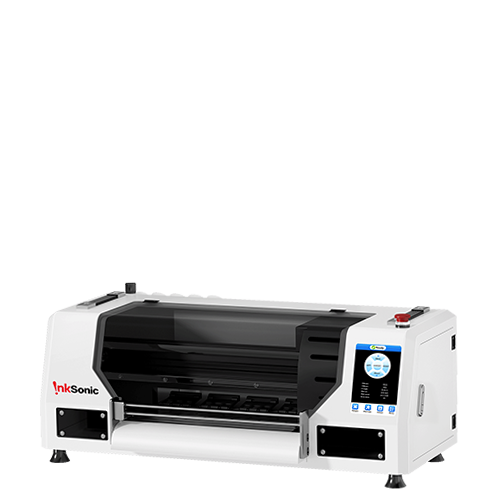
1. Inksonic L1800 E13
Perfect for beginners and small businesses.
Compact design for limited workspace
Uses Epson printhead for fine detail and color accuracy
Prints up to A3 size — ideal for T-shirts, hoodies, tote bags
Works seamlessly with Inksonic DTF inks and films
Delivers sharp, vibrant prints with smooth gradients

If you’re new to DTF, this model gives you a balanced mix of performance and simplicity.
Best for: Startups, home studios, or small batch production.
2. Inksonic XP600 U13 with Automatic Powder Shaker
Built for higher production efficiency.
XP600 printhead for faster output
Automatic powder shaker and curing system
White ink circulation and self-cleaning function
Stable film feeding for continuous roll printing

With this printer, you can handle bulk orders and achieve consistent results every time. It’s a professional-grade setup for those ready to scale up their apparel printing business.
Best for: Mid-sized businesses or print shops with daily orders.
Other Equipment You’ll Need for DTF Printing
A printer is only one part of the setup. To complete your DTF workflow, you’ll also need:
DTF Film: Prints your designs and holds ink layers before transfer.
DTF Adhesive Powder: Creates the bonding layer between design and fabric.
Curing Dryer or Powder Shaker: Melts the adhesive powder evenly on film.
Heat Press Machine: Transfers the cured design onto the garment under heat and pressure.
DTF Inks: Specially formulated for vivid color and wash resistance.
All of these supplies are available from Inksonic — designed to work perfectly with Inksonic printers for the best results.

How to Start DTF Printing with Inksonic
Starting your DTF journey doesn’t have to be complicated. Inksonic printers are pre-calibrated, tested, and supported by a professional team that ensures your success from day one.
When you buy an Inksonic DTF printer, you’ll receive:
Step-by-step installation guide
Ink and film starter kit
Technical support for setup and maintenance
Reliable warranty and after-sales service

So instead of worrying about printer conversions or technical setups, you can focus on what truly matters — creating beautiful designs and growing your business.
Choose a Printer That Sets You Up for Success
If you’re wondering what printer do I need for DTF printing, the answer depends on your goals — but for most beginners and small businesses, a dedicated DTF printer is the smartest investment.
The Inksonic DTF printer has been specially designed to fit the DTF ink, white layers and films exactly – This saves you time, ink, and labor. From the L1800 E13 to the XP600 U13 model, you can expect consistent print quality and performance at any level.
Don’t risk your business with untested conversions. Start strong with Inksonic — your trusted DTF printing partner.
Quick FAQs
Q1: Can I print DTF from my home printer?
No. Normal printers will clog or get damaged.
Q2: Do I need white ink for DTF?
Yes, white ink is essential to make colors pop on dark fabrics. Inksonic DTF printers include a built-in white ink circulation system.
Q3: What’s better — converted or dedicated DTF printer?
Dedicated DTF printers are factory-optimized, easier to maintain, and give better results than converted models.
Q4: Is DTF better than sublimation?
DTF gives more fabric versatility and bright colors, and can be printed on light and dark substrates — unlike sublimation, which mostly prints on polyester.


