




DTF (Direct to Film) printing is quickly becoming a mainstay of T-shirt design. These days, you’ll spot DTF printing everywhere—from streetwear to those quirky little custom shirts. The colors really pop, the details are sharp, and it sticks to almost any fabric. But don’t just throw a fresh print into the washer and hope for the best—if you actually want it to last, a bit of care goes a long way.
InkSonic will guide you through the whole process of DTF T-shirt care so you can get the most out of each item and have them continue to look "new."

Understanding DTF Prints
Before diving into care instructions, let's understand what DTF printing is. DTF, or Direct to Film, does not print directly onto the fabric. Instead of printing directly onto the shirt, the design goes onto a special film first, then gets dusted with hot-melt adhesive powder. When you heat-press it, the powder melts and sort of fuses the design into the fabric—almost like it’s been “welded” right in.
The result? Colors that really pop, details that stay sharp, and a soft feel instead of that plasticky stiffness you get with some transfers. Plus, it works on just about any fabric—cotton, polyester, you name it. Compared to screen printing with its endless layering or heat transfers that can peel, DTF is way more forgiving and long-lasting.
Durability, nevertheless, does not mean indestructible. Its longevity is with the controlled interaction between fabric, adhesive, and ink.
Mismatched heat, incorrect ink distribution, or post-print handling that is rough—like hot washes, aggressive spin cycles, or exposure to sunlight—can still lead to fading or cracking. In order to make your DTF T-shirt durable, you should first understand why the prints hold so well.

How DTF Prints Stay Secure on Fabric
The durability of DTF prints comes down to a “chemical + physical” combination. During printing, the DTF ink penetrates the coating on the transfer film, while the hot-melt adhesive acts as the crucial intermediary—melting under heat, seeping into the fabric fibers, then cooling and solidifying to lock the design in place.
Unlike standard heat transfers that just “stick,” this process is more like a color-fabric fusion. When temperature, pressure, and time are all controlled correctly, the print is soft yet strong and doesn’t easily crack when bent.
Even so, DTF prints can fade. Causes include poor-quality transfer film, incompatible or low-grade adhesive powder, or insufficient heat during curing. For more details, check out this article: Why Are My DTF Prints Coming Out Faded or Dull?
The chemical + physical bond also has its weak points: If the water temperature is too high, it can damage the fabric fibers and cause fading, which in turn affects the print adhered to the fabric, while excessive friction can damage the ink layer. Proper care is essential to keep your design firmly in place. And no matter how reliable the method, if production steps like curing or cooling are skipped, the print won’t survive multiple washes. Next, let’s see why those first few minutes after printing—curing and cooling—are so critical.
Curing and Cooling: The First Step to “Locking” Your Print
Printing your design is just the start. The trick to keeping your design looking fresh after dozens of washes? It’s all in the curing—making sure the adhesive and ink really sink into the fabric instead of just sitting on top.
Start by heating the adhesive in a controlled oven until it melts completely, locking the design into the fibers. Don’t rush to peel the film—DTF is cold-peel. Peeling while hot can distort edges. After peeling, apply a 5–10 second post-press to “compress” the adhesive deeper into the fibers for maximum durability.
We recommend using the InkSonic Powder Shaker to optimize this process:
- Even powder distribution: Manual application can be uneven; the shaker ensures consistent coverage.
Efficient curing: Built-in heating and drying evenly distribute heat, improving adhesion and preventing cracking or fading.
Optimized heat utilization: Reflective interior ensures faster, even heating and better curing results.
This seamless system reduces manual errors and ensures consistent, high-quality prints. Better powder adhesion translates into:
Brighter, sharper colors
Stronger resistance to peeling and cracking
Prints that remain intact after multiple washes
Elasticity suitable for various fabrics

Washing Tips for Your DTF T-Shirt

DTF prints are durable but sensitive to heat, friction, and chemicals. Proper washing keeps your designs bright and long-lasting.
Turn the shirt inside out
Wash inside out to prevent direct friction with other clothes, zippers, or buttons, reducing fading and damage.Use cold water
If the water temperature is too high, it can damage the fabric fibers and cause fading, which in turn affects the print adhered to the fabric. Cold water protects both ink and adhesive.Choose a gentle detergent
Use low-chemical, non-fluorescent detergents to reduce print corrosion and keep colors vibrant.Avoid bleach and fabric softeners
Bleach damages color molecules, and softeners form a film on fibers that can weaken adhesion over time.Avoid washing with rough fabrics
Use a laundry bag and wash with similar materials. Avoid denim, metal accessories, or zippers that can scratch or peel the print.
Drying Without Damaging Your Prints

Proper drying protects both the color and adhesive layer.
Air dry whenever possible
Lay flat or hang to dry naturally. This method is gentle and avoids heat stress.Avoid direct sunlight
Sunlight accelerates fading. Dry in shade or flip the shirt so the print isn’t directly exposed.Maintain shape and print alignment
Gently smooth wrinkles. Flat drying is safer for easily stretching fabrics.Be cautious with dryers
If necessary, use low heat. High heat can soften the adhesive and cause cracks.
Ironing and Heat Exposure

Even careful washing can be undone by improper ironing or heat storage.
Avoid direct contact with the print
Turn the shirt inside out to iron. Direct heat can soften or crack the adhesive.Use a baking paper and low temperature
If ironing on the print is necessary, cover it with baking paper or a thin cloth and use low heat.Store away from heat
Avoid leaving shirts in direct sunlight, near heaters, or in dryers. Heat softens the adhesive over time, causing cracks or slight peeling.
In short, ironing is not strictly forbidden, but must be done with low heat, a protective layer, and caution to keep prints soft and durable.
Even careful washing can be undone by improper ironing or heat storage.
Avoid direct contact with the print
Turn the shirt inside out to iron. Direct heat can soften or crack the adhesive.Use a baking paper and low temperature
If ironing on the print is necessary, cover it with baking paper or a thin cloth and use low heat.Store away from heat
Avoid leaving shirts in direct sunlight, near heaters, or in dryers. Heat softens the adhesive over time, causing cracks or slight peeling.
In short, ironing is not strictly forbidden, but must be done with low heat, a protective layer, and caution to keep prints soft and durable.
Conclusion
Taking care of your DTF T-shirts isn’t that complicated. Flip them inside out before washing, stick to cold water, use a gentle detergent, and air dry away from harsh sunlight—sounds basic, but trust me, it really helps. Your prints stay sharp, and the shirt hangs around longer than usual.
Those DTF prints? They’re pretty tough, thanks to that mix of chemistry and physics—but don’t get too comfortable. Even the strongest print can crack or fade if you toss it around like any regular tee. Just take a little care when washing, drying, and ironing—you’ll see the difference pretty quickly.
And, yeah, one more thing: starting with a solid printer and good-quality supplies actually matters. Get the right setup from the beginning, and your prints can take wash after wash, staying bright and sharp like the very first day. At the end of the day, looking after your shirt isn’t just about making it last—it’s about keeping those designs looking alive, like you really meant to show them off.
Choose the Right Printer, Make Care Count – Powered by InkSonic DTF
After mastering care techniques, don’t forget the source—your printing equipment. If you’re still using an old printer, don’t expect miracles. Many users rave about the InkSonic DTF Printer — sturdy, powerful, and able to consistently produce high-quality prints whether you’re making one shirt or a hundred.
Why does the right printer matter? The lifespan and vibrancy of DTF prints are determined from the start. Unstable equipment or uneven powder heating can cause fading or cracking after just a few washes. InkSonic printers provide precise temperature control, even heating, and efficient curing, ensuring consistent powder distribution and stable film tension.
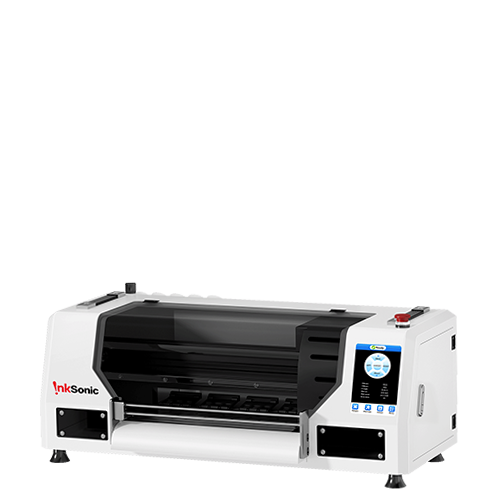
This particular model, the XP600 Dual Head DTF Printer with Powder Shaker & Dryer , comes with a powder shaker that helps the powder stick better, so your prints hold up longer and stay vibrant.
Bottom line? If you want your prints to still pop after 20 washes—or more—you’ve got to start with the right gear. When your printer and supplies are solid, all that careful washing, drying, and ironing actually pays off, keeping each T-shirt looking fresh like it just came off the press.


