









DTF printing is a much-desired digital printing technology, yet when working with it, especially the DTF films, customers often have some frustrating issues. The following article provides common issues of DTF films and solutions to further enhance printing quality and efficiency.
1. Why There's Banding in DTF Prints

The most common cause is printhead clogging. If the DTF printer has not been used for a long time, like two days, and when starting printing again, the ink could cause printhead clogging.
Solution: Regularly clean the printhead and check the nozzles to ensure smooth ink flow.
2. Why Is the DTF Print Difficult to Peel Off

Cause: DTF PET film is divided into two layers: an ink-absorbing layer giving pattern imaging, and a release layer easy to peel off after transfer. If the release layer is not coated evenly or of poor quality, peeling the pattern off becomes an issue.
Another common reason is that the DTF film may not have fully cooled before the transfer. Right after heat pressing or heating, the surface temperature of the film is still high. Attempting to peel it at this stage can cause strong adhesion between the pattern and the film, making it difficult to peel off smoothly.
Solution: Purchase high-quality DTF films to possess an even release layer for easy peeling off after transfer.
3. Why Is the Printed Pattern Color Uneven

Cause: Poor quality of the transfer film is usually caused by uneven coating of the ink-absorbing layer.
Solution: Choose PET films with stable and even coatings and quality for even ink distribution and clear, even colors.
4. Why Does the Ink Flow When Printing
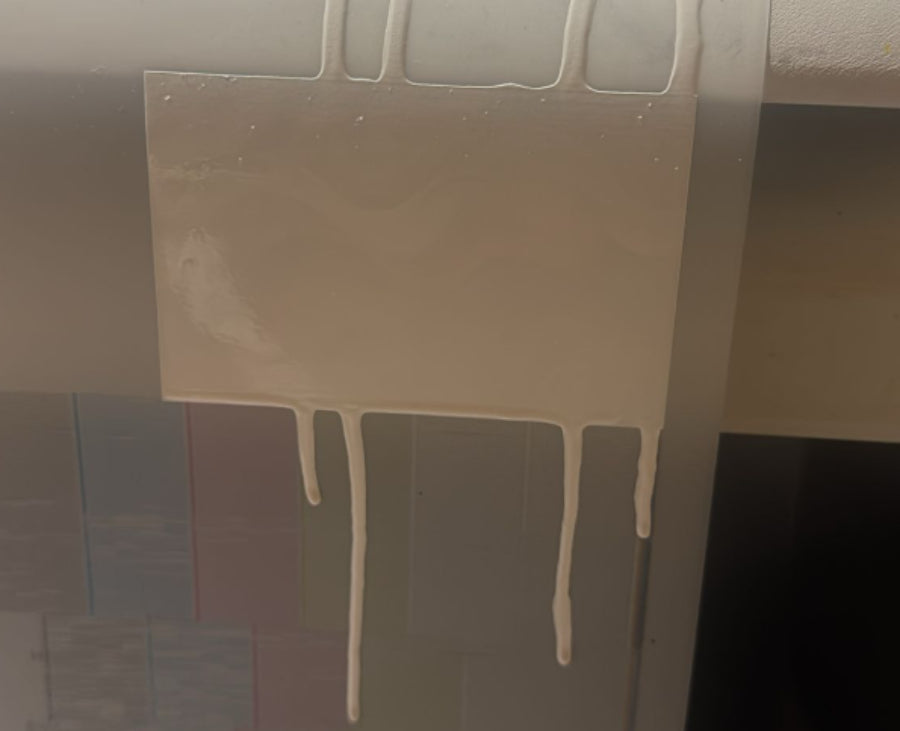
Cause: Printing on the reverse side of the film, or the film having poor ink absorption performance itself, causing ink to fail to be absorbed timely and flow down.
Solution: Check for correct usage of ink-absorbing side of the film and employ good-quality films with appropriate ink absorption.
5. Why Does the Printed Film Stick Poorly
Cause: Could be due to the DTF film's surface coating problem or incompatibility between film and ink, which results in poor adhesion.
Solution: Employ compatible ink and film to achieve good adhesion. Establish baking and heating durations, if required, to enhance bonding.
6. Why Does the DTF Result Easily Peel Off

Cause: Over-baking temperature or over-baking time causes film layer brittleness, or uneven ink layer thickness, resulting in cracking. This is also related to the fabric of the garment itself. If the material has large gaps—such as in knitted sweaters—it can also make peeling difficult.
Solution: Reasonably control baking temperature and time, adjust printing parameters, and ensure even ink layers.
7. Why There Are Bubbles on Printed Film

Cause: High humidity during printing or film surface dust and contamination.
Solution: Maintain a dry and clean printing environment, clean the film surface before printing, and prevent dust and moisture interference.
8. How to Store DTF Printing Films
8.1 Unused DTF Printing Films Storage Tips:
- Store the DTF films in their original packaging to avoid exposing them to direct air, which can lead to moisture and dust contamination.
- Store in cool, dry, well-ventilated areas, and away from elevated temperatures and direct sunlight. The ambient temperature should be close to 20°C with a relative humidity of 40%-60%.
- Do not expose the DTF film to any sharp objects that can scratch or deform its surface.
- Avoid creasing or folding DTF film rolls; preserve the original flat state for maintaining print quality.
8.2 Printed DTF Films Storage Tips:
Let the film air dry after printing; do not use sudden heat or air circulation to avoid smudging or cracking the ink.
Store rolled-up or flat printed films, not creased or bearing pressure marks.
Store printed films for the long term in dry, sealed bags to avoid moisture and dust penetration.
The storage environment should also be dry, not exposed to sunlight and dramatic temperature changes to help maintain the stability of ink and film layers.
Good storage methods not only extend the service life of DTF films but also ensure print quality and reduce material loss.
9. How to Reduce DTF Printing Film Waste
Plan Size and Layout
Before printing, try to reasonably size and lay out patterns. Consolidate several small patterns on one film sheet, or use the one-click layout option in my special design software to reduce waste. Don't leave too much blank space between patterns to conserve film.
Control Ink Usage
Adjust printer ink density and coverage to avoid excessive ink from wetting the whole film surface, saving ink and reducing wastage of film. Use enough ink without wastage by moderately adjusting nozzle settings.
Test Before Printing
In order to achieve optimal color and print effects, perform a limited-range test print prior to actual printing. Avoid using large pieces of film for debugging, thus reducing material wastage.
Use Leftover Film Effectively
Small samples or patterns can be printed using leftover pieces of unused film that would otherwise go to waste, maximizing usage.
Avoid Repeated Reprints
Track equipment status and preserve nozzle freedom from obstruction to allow successful printing once. Avoid repeated reprints because of clogging or color drift, saving film and ink.
Regularly Perform Printer Maintenance
Keep the printer regularly cleaned and maintained to prevent clogging of nozzles and color bias, minimizing equipment-related material losses.
10. Conclusion
The printing quality of the DTF depends on high-quality PET films and smooth working procedures. Having knowledge and solving common film problems mentioned above can make a huge difference in print effects and avoid unnecessary waste materials. Take good care of your equipment and choose high-quality consumables from reliable suppliers so your DTF printing operation will be smooth.


